What is the best autofill extension for Workday? A closer look at the application details that matter
What is the best autofill extension for Workday? Compare what matters in a Workday application filler, including saved profile data, required-field checks, and your control over submission.

Free Chrome extension
Autofill your next job application
JobWizard is a free Chrome extension that fills applications, tracks statuses, and optimizes your resume.
If a Workday application asks you to reenter your work history, education, and contact details, it can be hard to tell which browser extension will actually help. What is the best autofill extension for Workday? The right choice should fill detected fields from your saved information, make unanswered questions easier to find, and leave you in control of the final review and submission.
What is the best autofill extension for Workday?
The best fit is an extension that reduces repetitive typing while making it easy to check what still needs your attention. JobWizard’s Smart Autofill uses saved profile and resume data to fill detected fields on supported application pages. It does not submit the application for you.
That distinction matters because Workday applications can include questions that need a considered, personal answer. You should be able to check populated information, handle questions that need your input, and submit only when the application is ready.
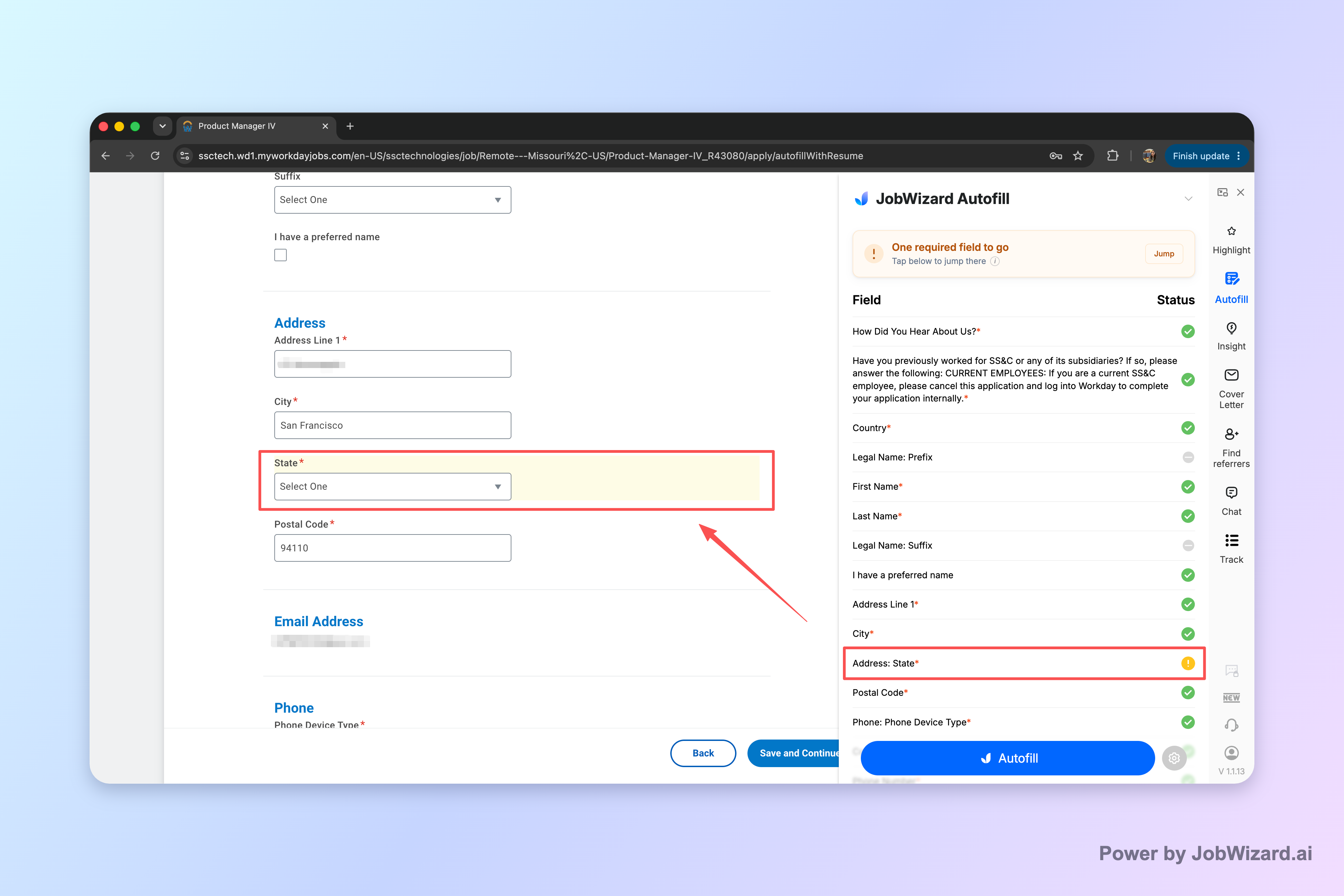
JobWizard can also identify a required field that still needs attention and let you jump to the matching question. That makes it easier to spot an incomplete part of the form without assuming that every field has been filled.
JobWizard reports more than 720,000 applications submitted and more than 600,000 autofill sessions run through the product. These are application and session totals, not counts of users or accounts.
JobWizard autofills an average of about 18 repetitive fields per application, typically 11–23. Sponsorship, salary, EEO, and custom questions are left for you to review before you submit.
For a broader walkthrough of the process, see How to Autofill Job Applications (Step-by-Step with JobWizard). It explains where autofill fits into an application workflow and why a final review remains important.
What should you compare in a Workday autofill extension?
Compare how an extension handles your saved information, unanswered questions, and final submission—not just how quickly it fills a form. A useful tool should support the parts of the application that are repetitive without making it harder to notice what requires your attention.
| What to check | Why it matters | What JobWizard does |
|---|---|---|
| Source of form information | Using saved details can reduce repeated entry, but the populated information still needs checking. | Uses saved profile and resume data to fill detected fields on supported application pages. |
| Required fields needing attention | A partly completed form may still contain a question you must answer. | Can identify a required field that needs attention and let you jump to the matching question. |
| Who submits the application | Reviewing answers before submission helps you catch mistakes and handle personal questions yourself. | You review the populated fields and submit the application yourself. |
| Website support | Do not assume one extension works on every employer’s form or every field. | Works on supported application pages; coverage should not be treated as universal. |
JobWizard usage data shows that about 65% of applications submitted through it are on Workday. The remaining reported platform shares are about 19% Greenhouse, 12% Ashby, and 4% Lever. These figures describe JobWizard activity; they do not establish that any extension supports every version of a platform.
When assessing other tools, compare their documented features and test whether they suit your own application process. Products such as Simplify and other job-search tools may offer different workflows; choose based on the features you need rather than assuming every product works the same way.
How does JobWizard autofill work on a Workday application?
JobWizard fills detected fields from saved information, then leaves you to check the form and complete the submission. The intended workflow is assistance with repetitive details—not blind auto-apply or automatic submission.
- Open a supported application page. Start the Workday application you want to complete.
- Use your saved profile and resume data. JobWizard fills detected fields where supported.
- Check for fields that still need attention. If a required field remains incomplete, JobWizard can identify it and let you jump to the corresponding question.
- Review and submit yourself. Check every populated answer, provide your responses to personal or custom questions, and submit the application when it is ready.
JobWizard’s reported platform mix suggests that Workday is where its autofill is used most often. The product data also describes the workflow as autofill plus review-before-submit: sponsorship, salary, EEO, and custom questions remain for you to review.
Autofill is not a guarantee that an application is complete or that every answer is correct. Treat the filled form as a draft to inspect, and use the required-field check as a prompt to look more closely—not as a replacement for reading the application.
How to decide if JobWizard is the right Workday extension
Choose JobWizard if filling repeated details and locating unanswered required questions would help your application routine. It is designed to use saved profile and resume information on supported pages while preserving your role in reviewing answers and submitting the application.
It may be less relevant if you expect an extension to handle every question across every employer’s website or submit applications without your review. Those are not the promises to use when evaluating JobWizard. Its approved workflow is field filling, attention to required questions, and user-controlled submission.
For a closer look at AI-assisted browser tools, read What is the Best AI Chrome Extension for Job Applications? Why JobWizard’s Smart Autofill Stands Out. If you are weighing no-cost options, see Is There a Free AI Extension for Autofilling Job Applications? What to Know Before You Install.
You can also compare this Workday-focused discussion with The Best Chrome Extension for Workday Applications in 2026. The useful question is not whether one tool is best for everyone, but whether its supported workflow matches how you want to complete and check applications.
Do this automatically with JobWizard
Skip the manual work — JobWizard's Smart Autofill handles this for you. On these platforms: Workday autofill.
Frequently asked questions
What is the best autofill extension for Workday?
The best autofill extension for Workday depends on whether it fits your application workflow. JobWizard uses saved profile and resume data to fill detected fields on supported application pages, identifies required fields that still need attention, and leaves review and submission to you.
Does a Workday autofill extension submit applications for me?
Not necessarily, and you should check how a tool handles submission. JobWizard fills detected fields on supported pages, but you review the answers and submit the application yourself.
Can a Workday autofill extension fill every field?
No extension should be assumed to fill every field on every Workday application. JobWizard can identify a required field that still needs attention and let you jump to the matching question.
How do I choose the best autofill extension for Workday?
Compare whether it uses your saved profile and resume data, how it helps you locate unanswered required questions, and whether you can review each answer before submitting. The best autofill extension for Workday is the one that supports your workflow without taking away that final review.
Try JobWizard Autofill on your next Workday application. Review every populated answer, handle any remaining questions, and submit the application yourself when you are satisfied with it.
Frequently Asked Questions
Autofill your next job application
JobWizard is a free Chrome extension that fills applications, tracks statuses, and optimizes your resume.