What is the best Chrome extension to autofill job applications? Choose one that leaves you in control
What is the best Chrome extension to autofill job applications? Compare how autofill, review, and submission work so you can choose a tool that fits your application workflow.

Free Chrome extension
Autofill your next job application
JobWizard is a free Chrome extension that fills applications, tracks statuses, and optimizes your resume.
What is the best Chrome extension to autofill job applications? Start with control
The best Chrome extension is the one that fills repetitive fields on the application sites you use while letting you check every answer before submitting. If you are asking, “What is the best Chrome extension to autofill job applications?”, compare the actual workflow—not just a promise to apply faster. A helpful extension can reuse your information, but it should not make you assume that every answer is right or every form is supported.
JobWizard’s Smart Autofill uses your saved profile and resume data to fill detected fields on supported application pages. You review the populated fields and submit the application yourself, so the final decision stays with you.
For a fuller walkthrough of the process, start with How to Autofill Job Applications (Step-by-Step with JobWizard). It explains the broader workflow; this guide focuses on what to look for when choosing a Chrome extension.
What should the best Chrome extension to autofill job applications do?
Look for useful form filling, clear handling of unanswered questions, and a review step before submission. Those basics matter more than a broad claim that an extension can handle every application automatically. Job application forms vary, so a good fit should help with repeatable information without obscuring what still needs your attention.
- Use information you recognize: The extension should draw on your saved profile or resume details rather than require you to re-enter the same basics for each application.
- Fill detected fields: Autofill should populate fields it can identify on supported application pages. Do not assume it can interpret every custom prompt or form layout.
- Make gaps visible: Check whether the tool helps you find a required field that remains unanswered instead of letting you overlook it.
- Keep review and submission separate: You should be able to inspect the form, correct details, and make the submit decision yourself.
- Fit your regular workflow: Consider the application sites you use and how much time you want to spend checking answers, editing responses, and handling unusual questions.
These criteria help distinguish assisted form filling from automatic submission. Autofilling is useful when it takes care of repeatable fields; it is not a reason to skip checking dates, contact details, work history, or answers that depend on a particular role.
JobWizard’s approach is straightforward: its Chrome extension uses saved profile and resume data to fill detected fields on supported pages. If a required field still needs attention, JobWizard can identify it and let you jump to the matching question.
How JobWizard’s autofill and review workflow works
JobWizard fills detected fields from saved information, then leaves you to review and submit the application. That workflow is useful when you want help with repeated form entry but still need to make sure each application reflects your current information and the role you are pursuing.
For example, imagine an application form that asks for your name, contact information, education, and work history, then adds a role-specific question. JobWizard can fill detected fields using your saved profile and resume data on a supported page. You can review the populated information, correct anything that needs updating, and consider the role-specific question yourself before you submit.
If the form includes a required field that remains incomplete, JobWizard can identify it and let you jump to that question. That is a practical part of the workflow: a form may contain fields that need your attention even after autofill has handled the information it recognized.
On platforms such as Lever, the important distinction is autofill followed by review, not a fully automatic application. The example below shows an application ready for the job seeker to check before submitting.
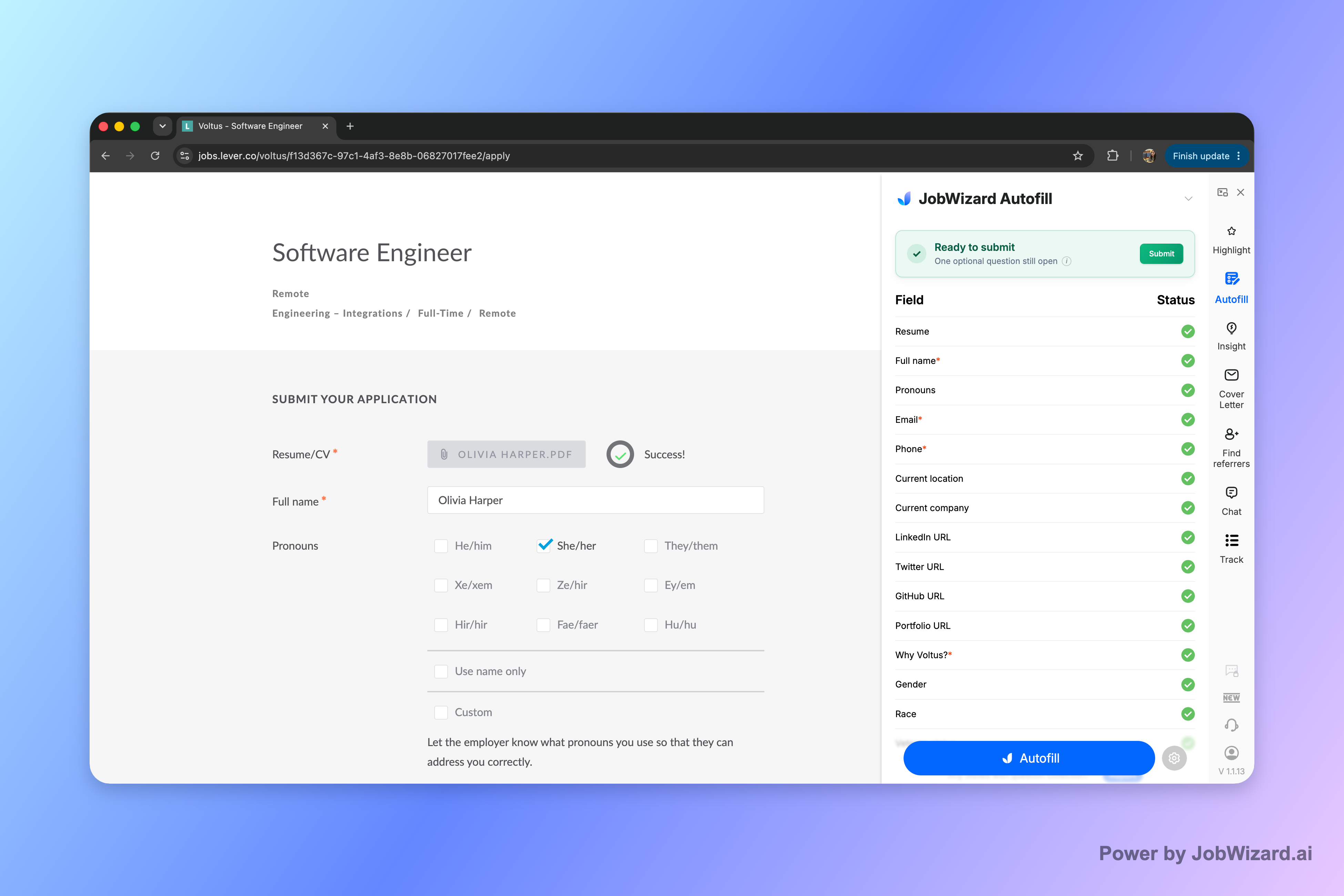
Before you submit, check that the company and role are correct, your contact details are current, and any answers that depend on the specific job are accurate. Give extra attention to fields you filled or edited yourself; autofill can reduce repetition, but it does not replace your judgment.
For more on the product’s broader AI and browser-extension approach, read What is the Best AI Chrome Extension for Job Applications? Why JobWizard’s Smart Autofill Stands Out. If Workday is a frequent part of your search, see How to Auto-Fill Workday Applications with the Best Chrome Extension for a platform-specific discussion.
How to compare Chrome extensions without assuming every form is the same
Compare the workflow and the claims you can verify, rather than expecting one extension to handle every application identically. Different tools may suit different job seekers, and the right choice depends on the sites you use, the kind of help you want, and how much control you want over each application.
| What to compare | Questions to ask | Why it matters |
|---|---|---|
| Form support | Does the extension work on the application pages you regularly encounter? | Support can vary by site and page, so avoid assuming universal coverage. |
| Information used | Can it reuse saved profile or resume details for detected fields? | Reusing accurate information can reduce repetitive typing. |
| Unanswered fields | What happens when a required question is not filled? | You need a reliable way to notice and address gaps before submission. |
| Review and submission | Do you inspect the answers and decide when to submit? | Review helps catch outdated details and role-specific responses that need your input. |
| Fit with your habits | Does the tool complement the way you organize applications and tailor materials? | An extension is most useful when it fits your real process rather than adding steps you will not use. |
Consider trying a tool on one application and checking what it fills, what it leaves blank, and how easy it is to correct an answer. That small test tells you more about fit than assuming a feature name guarantees the same experience on every page.
Autofill tools are not all the same as auto-apply tools. If you are comparing those approaches, this discussion of the bot pitfalls and the autofill alternative you control offers another perspective on keeping the application review in your hands.
How to use autofill responsibly on your next application
Use autofill for repeatable information, then make a deliberate pass through the whole form before submitting. This keeps the time-saving part of the workflow separate from decisions that depend on the employer, position, or your current preferences.
- Keep your source information current. Check your saved profile and resume details before relying on them in an application.
- Open a supported application page. Use the extension where it can detect fields, and do not assume every website or form behaves the same way.
- Inspect what was filled. Verify contact details, employment dates, education, and any other populated information against your current records.
- Handle unanswered questions yourself. Read custom or required prompts carefully, and provide answers that are accurate for that particular application.
- Review the complete form and submit. Confirm the role and employer, check for missing information, and submit only when the answers are ready.
A concrete example: if the form fills your work history but asks why you are interested in the position, treat that final question as a separate task. Reusing accurate background information is different from choosing a response that explains your interest in a particular job.
The same principle applies to any employment-related question where your answer must reflect your individual circumstances. Slow down, read the wording, and review your response before moving forward. Automation should assist your application, not make the decision for you.
Do this automatically with JobWizard
Skip the manual work — JobWizard's Smart Autofill handles this for you.
Frequently asked questions about the best Chrome extension to autofill job applications
These answers cover the key differences between autofill, application support, and automatic submission. Use them to assess whether a Chrome extension matches the way you want to apply.
What is the best Chrome extension to autofill job applications?
The best Chrome extension depends on your application workflow. JobWizard is a fit if you want saved profile and resume data to fill detected fields on supported application pages while you review answers and submit each application yourself.
Does JobWizard automatically submit job applications?
No. JobWizard fills detected fields using saved profile and resume data, but you review the populated answers and submit the application yourself. Review important details and any custom questions before submitting.
Can a Chrome extension fill every job application field?
No extension should be assumed to fill every field on every site. JobWizard works on supported application pages, and it can identify a required field that still needs attention and let you jump to that question.
How should I choose a Chrome extension for autofilling job applications?
Check which application sites it supports, what information it uses to populate fields, how it handles unanswered questions, and whether you stay in control of review and submission. Test it on an application and verify each answer before submitting.
Try JobWizard Autofill on your next application and review every answer before you submit. You stay responsible for the final form and the decision to apply.
Frequently Asked Questions
Autofill your next job application
JobWizard is a free Chrome extension that fills applications, tracks statuses, and optimizes your resume.