“Another Way to Say Follow Up” That Sounds Intentional (and Gets Read)
Looking for another way to say follow up that feels professional and specific? Use wording like “checking in on my application status” and pair it with a clear next step.
Free Chrome extension
Autofill your next job application
JobWizard is a free Chrome extension that fills applications, tracks statuses, and optimizes your resume.
Use “another way to say follow up” by switching from vague to specific.
If you’re searching for another way to say follow up that still sounds confident, the easiest fix is to replace “follow up” with a purpose-based phrase—something like “checking in on my application status” or “requesting an update on next steps.” That tiny shift makes your message read as helpful, not persistent.
In this guide, you’ll get multiple ready-to-send alternatives, plus a simple way to time your messages using your application tracker—so you don’t guess or spam.
Best “another way to say follow up” phrases to use in job searches.
Pick wording that clearly signals what you want: confirmation, status, or next steps. When in doubt, choose the phrase that matches your goal (status check vs. interview follow-up vs. general re-contact).
Professional alternatives (email subject + first line)
- “Checking in on my application status” — Great for roles you’ve applied to.
- “Requesting an update on next steps” — Works when you want to know what happens after review.
- “Following up regarding my application” — The classic, but more formal when you add the role + date.
- “Inquiring about the status of my application” — Slightly more formal; use if you’re contacting a recruiter or hiring manager.
- “Confirming receipt of my application” — Use if the posting referenced receipt, but keep it polite (don’t sound demanding).
Follow-up wording that fits after an interview
- “Checking in on next steps” — Works when you already spoke with them.
- “Revisiting our conversation” — Good for niche roles; feels thoughtful and grounded.
- “Thank you again—any updates on the process?” — Warm and direct.
What to avoid (so it doesn’t feel pushy)
- Avoid “just circling back” repeatedly without context—use it once, then be specific.
- Avoid language that sounds like pressure (e.g., “I need an answer by…”).
- Avoid vague lines like “Any updates?” without including the role name.
Tip: Keep your opener aligned with what you’re asking. If you want status, say status. If you want timeline/next step, say next steps.
Copy-and-paste check-in messages (with placeholders you can customize).
Once your another way to say follow up phrase is chosen, the rest is structure. Below are message templates that keep your tone professional and your ask clear.
Template A: After applying (application status)
Subject: Checking in on my application status — [Role Title]
Hi [Name], I hope you’re doing well. I’m reaching out to check in on my application status for the [Role Title] position, which I applied to on [Date or “early this week”]. If you’ve had a chance to review, I’d appreciate any update on next steps. Thank you for your time, and I’m happy to provide anything else you need.
Template B: After applying (next steps inquiry)
Subject: Requesting an update on next steps — [Role Title]
Hi [Name], I’m following up because I’m still very interested in the [Role Title] role. I wanted to request an update on next steps after my application submitted on [Date]. Please let me know if there’s anything additional that would be helpful. Thanks again, [Your Name]
Template C: After interview (process timing)
Subject: Checking in on next steps — [Role Title]
Hi [Name], Thank you again for speaking with me about the [Role Title] role. I’m writing to check in on next steps and see whether there’s an update on the hiring timeline. I remain excited about the opportunity and would welcome any information on what to expect next. Best regards, [Your Name]
Template D: Short LinkedIn-style note
Hi [Name] — I wanted to check in on my application status for [Role Title] (applied [Date]). If you know the next step or timeline, I’d really appreciate it. Thanks!
Quick editing rule: Replace the placeholder role title and date, then delete any sentence that doesn’t support the ask.
Time your follow-up using application activity, not vibes.
A big reason people struggle to find another way to say follow up that feels right is timing. When you don’t know where you are in the process, you either wait too long or message too soon.
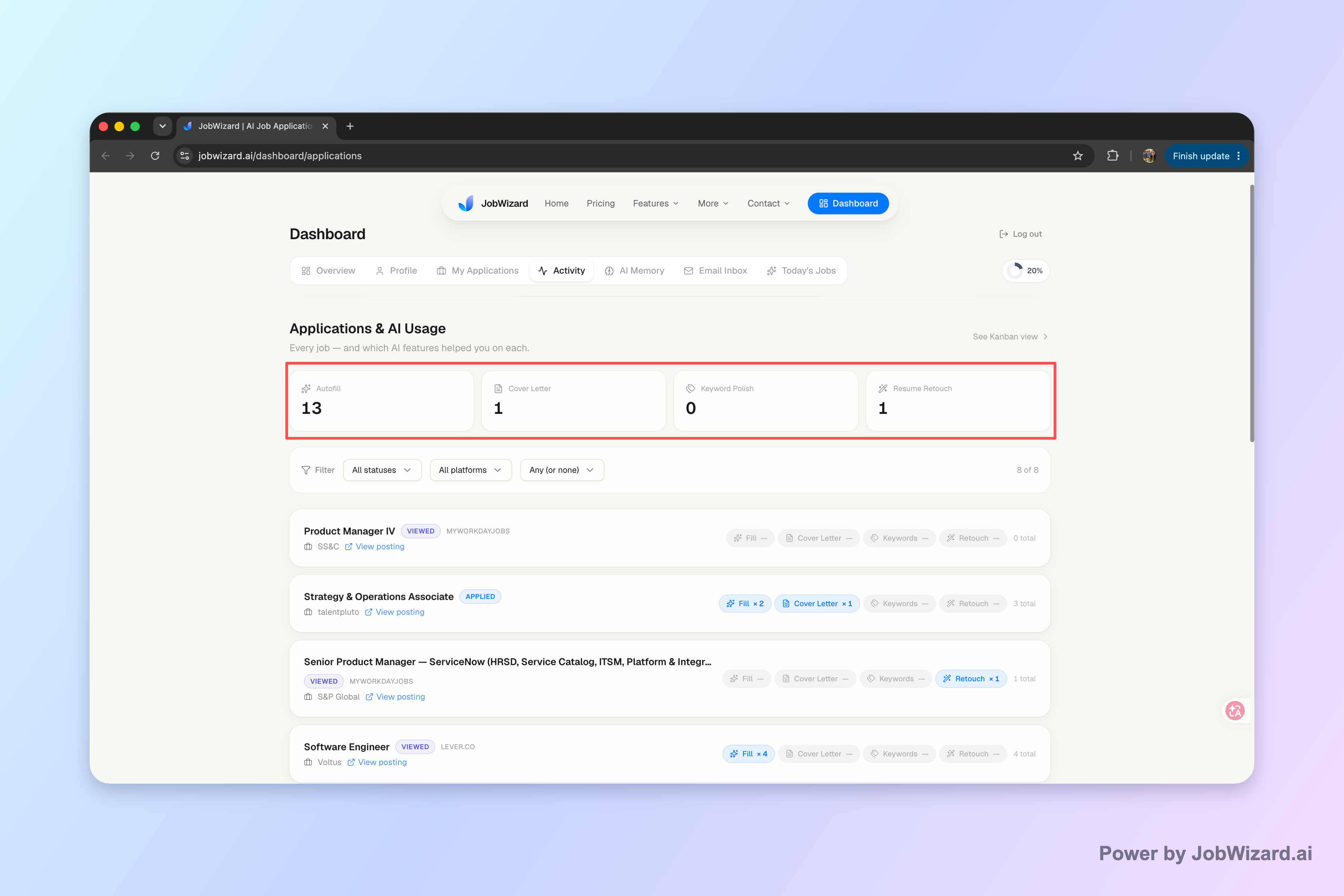
Job tracking helps you keep context: where the application stands and which tools you used along the way. The Activity view shows application status and which JobWizard tools were used for each role, so your follow-up is based on what you know—not what you hope.
What to track before you message
- Application status: Are you “under review,” “in process,” or marked another way?
- Tool notes: Which JobWizard tools were used for that role.
- Your last touch: When you sent your previous check-in (and what you asked for).
A simple follow-up timeline you can actually use
- Apply: Save the job title + date immediately.
- Wait for review window: Use the typical timeframe you’re seeing in postings and your own notes.
- Send one status check: Use a status-focused opener (like “checking in on my application status”).
- Re-check tracking: Only follow again when your notes/status indicate it’s appropriate.
Job tracking doesn’t guarantee outcomes—use it to support consistent communication and accurate context.
Limitation to keep in mind: Don’t assume every application update will be detected automatically, or that tracking improves hiring outcomes. It’s a process clarity tool so your follow-ups are more organized and relevant.
Word choice vs. content: what matters most when you “follow up.”
Using another way to say follow up is helpful—but the stronger signal is the content underneath it: clarity, relevance, and a respectful ask.
Three ingredients that increase “readability”
- Role clarity: Include the exact job title so they can match it quickly.
- Timing context: Add the application date or timeframe.
- Specific ask: Status update or next steps—pick one.
One sentence that makes your message feel human
Add a short line that shows genuine interest, such as: “I remain excited about the opportunity and would welcome next steps.” Keep it to one sentence—no long pitch reruns.
How long should it be?
Short is usually better for recruiter and hiring-manager attention. Aim for 2–4 sentences, then sign off professionally.
Do this automatically with JobWizard
Skip the manual work — JobWizard's Application Tracker handles this for you.
FAQ: Another way to say follow up (without sounding pushy).
What’s an “another way to say follow up” that doesn’t sound pushy?
Try a “checking in on my application status” opener, then add a one-line reason (e.g., you’re still interested and would welcome next steps). This keeps the tone polite and specific rather than demanding.
What should I write after I’ve already applied—when I want an update?
Use a status-focused check-in: mention the role title, the date you applied (or approximate timing), and ask whether they’ve had a chance to review. Keep it to 2–4 sentences and end with “If there’s anything else you need, I’m happy to provide it.”
How do I time my follow-up message without spamming?
Track each application and its status so you know where you are in the process. A simple rule: wait until you’re past the typical review window you’re seeing in job postings, then send one check-in and follow your notes for any later message.
Should I use a short email or a longer note for a follow-up?
Start short. A brief, clear message usually performs better: one paragraph for context (role + application timing), one sentence for the ask (application status / next step), and one closing line with availability.
Ready to make follow-ups easier? Use JobWizard to keep each application and its next step in one activity view, so you can send the right check-in at the right time—using an another way to say follow up that sounds intentional.
How to Track Job Applications: A Practical System (JobWizard + Beyond)
Prefer message wording? Start here: Another Way to Say Follow Up Professionally: Lines That Stay Polished (Not Pushy), then pair it with the right timing using Job Follow Up Message That Gets a Real Reply: Timing, Templates, and What to Say.
If you’re checking status after an interview, use Follow Up Letter After Interview to Check Status: A Recruiter-Ready Check-In Script (When & What to Say).
Frequently Asked Questions
Autofill your next job application
JobWizard is a free Chrome extension that fills applications, tracks statuses, and optimizes your resume.