Jobright vs Simplify: How to Choose the Right Job Automation for Your Workflow
Jobright vs Simplify is a practical choice about how you handle repetitive fields and the final “review-before-submit” step. Learn the tradeoffs so you can move faster without skipping important questions.

Free Chrome extension
Autofill your next job application
JobWizard is a free Chrome extension that fills applications, tracks statuses, and optimizes your resume.
How do Jobright vs Simplify differ for speeding up job applications?
Jobright vs Simplify usually comes down to one workflow choice: how much of your application you want handled as repetitive-field autofill, versus what you prefer to personally review and tailor right before you submit.
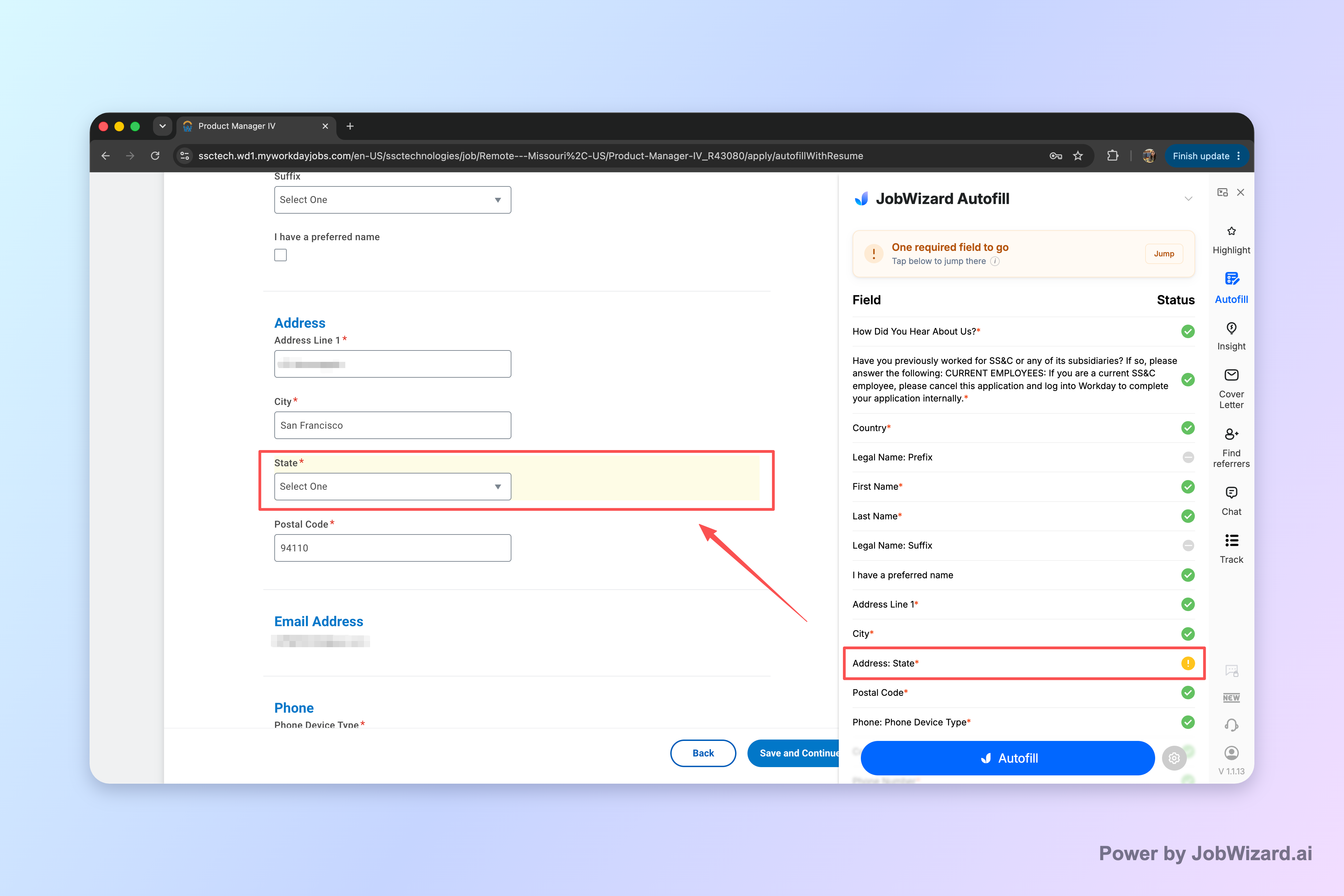
Imagine you’ve applied to 25 roles this week and the first 10 fields (name, contact, address, education basics) start to feel like copy-paste work. You want speed—but you also can’t afford to mess up the parts that must be accurate, like salary expectations, EEO answers, and custom screening questions.
Key idea: the best job automation setups are “autofill + review-before-submit”—fast repetitive fields, then you confirm the role-specific details.
In this guide, we’ll compare how to think about jobright vs simplify in a way that maps to real application workflows, including what to check during review and how platform choice (especially Workday) affects the value.
Key takeaway: Treat the decision as “how you want repetitive fields handled” plus “how carefully you review the final questions before submitting.”
What’s the main difference between Jobright vs Simplify?
The main difference is the balance between automated completion of repetitive application fields and the handoff back to you for the final review.
With modern job application automation, the practical pattern is typically: repetitive fields get filled quickly, then you review and submit. That means the tool’s value is strongest when your applications share the same “core” information across roles.
- Autofill focus: repetitive fields are completed faster so you can spend your attention on the parts that vary by job.
- Your final say: you still confirm sponsorship/supporting info, salary expectations, EEO/voluntary questions, and any custom questions.
Key takeaway: Choose the tool that best fits your preferred workflow: quick repetitive-field completion + a review step you trust.
Will either tool auto-submit applications for me?
Whether it auto-submits is where many job seekers get cautious—and the safest way to evaluate any tool is to understand its flow as “autofill + review-before-submit.”
In this pattern, the tool accelerates filling repetitive fields, but you remain responsible for validating and submitting. That approach helps prevent accidental errors in the pieces that change per employer or per posting.
| Application step | What it typically includes | Recommended action |
|---|---|---|
| Autofill (repetitive fields) | Common profile/contact/education basics that appear across many applications | Let the tool fill these fast, then do a quick skim for obvious mismatches |
| Review-before-submit | Sponsorship/some employment details, salary/compensation inputs, EEO/voluntary demographic answers, and custom screening questions | Read each item carefully and confirm your answers are correct |
| Final submit | Submission confirmation after you’ve validated role-specific questions | Submit only when everything on the final review page matches your intent |
Key takeaway: Treat automation as “fill fast, you verify”—that’s the workflow design that reduces avoidable mistakes.
How much autofill is typical per application?
Autofill coverage is usually measured by how many repeated fields are filled for you, not by “guaranteed job outcomes.”
JobWizard, for example, autofills an average of ~18 repetitive fields per application (typically 11–23). The important part for your decision isn’t the exact number—it’s that these are the boring, repeated fields you don’t want to retype 20 times.
- Best fit: apply to many roles that share common information (contact, education, employment history basics).
- Time-saver: the fewer repeated fields you’d otherwise manually copy, the bigger the benefit.
- Still requires focus: the review step is where accuracy matters most.
Key takeaway: Look for tools that reliably speed up repetitive fields, while keeping your control over the final answers.
Which ATS platforms benefit most from autofill—Workday, Greenhouse, Ashby, or Lever?
Workday often benefits the most because it’s where autofill tends to save the most time as part of the repetitive-field workflow.
JobWizard usage shows the distribution of where applications happen: ~65% on Workday, ~19% on Greenhouse, ~12% on Ashby, and ~4% on Lever. That doesn’t mean other ATS platforms are “worse”—it means your mileage depends on where you apply most.
- Workday: where the repetitive-field autofill tends to be most valuable.
- Greenhouse / Ashby / Lever: still supported in the broader autofill + review-before-submit pattern, but the value may vary by posting flow.
Key takeaway: If you apply heavily on Workday, prioritize tools that streamline repetitive-field completion there.
What does “review before submit” mean in practice?
Review-before-submit means you quickly accept the filled-in repeated fields, then carefully verify everything that’s role-specific or high-stakes.
This is where jobright vs simplify comparisons matter for real users: the tool can speed up the mechanical parts, but you’re still accountable for the answers that reflect you and the posting requirements.
- Scan for accuracy: check spelling, addresses, dates, and any fields that might not auto-match perfectly.
- Confirm sponsorship details: make sure employment authorization/sponsorship items are correct.
- Verify salary/compensation: don’t let a wrong value slip through.
- Answer EEO/voluntary fields: ensure your demographic/EEO answers are what you intend.
- Review custom questions: treat these as part of your application strategy, not paperwork.
Key takeaway: The fastest workflow still protects your intent—automation fills, you validate.
What should I check during review before submit to avoid mistakes?
The biggest avoidable errors usually happen in the fields that differ across employers—so your review checklist should focus there.
As a baseline, you should treat the following as “must-verify” categories every time you submit.
- Custom questions: role-specific screening, eligibility prompts, and scenario questions.
- Salary expectations: compensation ranges can vary and wrong numbers can harm credibility.
- EEO/voluntary demographic fields: confirm these carefully (they’re often easy to misread).
- Sponsorship/supporting details: double-check that your status aligns with your intent.
Key takeaway: Review the “high-variation” fields every time—custom questions, salary, EEO, and sponsorship.
How do I tailor custom questions while using automation?
You can automate the repetitive work and still tailor answers, as long as you treat custom questions as your responsibility.
A common pattern: let the tool fill profile basics and standard experience fields, then spend your time writing short, specific responses that match the job description. If the application asks for short form answers, use your notes and the posting keywords to keep your response grounded.
Copy-paste template (custom question starter)
Thanks for considering my application. I’m excited about this role because I’ve supported similar responsibilities involving [specific responsibility]. In my recent experience, I [specific accomplishment/result aligned to the posting]. I’m especially interested in [company/team reason] and can contribute by [how you’ll help].
When you’re comparing jobright vs simplify, ask: which workflow makes it easiest to pause, review, and tailor only the parts that need your voice?
Key takeaway: Use automation to remove typing from the process, then tailor custom questions to stay persuasive.
How many applications are typical when using job automation?
Job automation is about throughput—you can submit more applications faster—but you still control the final accuracy via review-before-submit.
JobWizard usage includes 720,000+ applications submitted and 600,000+ autofill sessions run through the platform. The key is that you’re not blindly auto-submitting: the autofill fills repetitive fields quickly, while you review sponsorship/salary/EEO/custom questions before you submit.
Key takeaway: Throughput improves when you reliably reduce repetitive work, but quality still depends on your review and tailoring.
Is Workday where autofill saves the most time?
Yes—Workday is where it saves the most time within the repetitive-field autofill + review-before-submit workflow.
That’s consistent with JobWizard’s observed distribution of where applications land (~65% Workday). If you’re mostly applying in other ATS systems, your best bet is still to evaluate the tool by how consistently it speeds up repetitive fields and how smoothly it supports your final review.
- If you apply on Workday often: prioritize a workflow optimized for repetitive-field completion there.
- If you mix ATS systems: compare how the tool handles repetitive fields across each platform—then rely on your review step for accuracy.
Key takeaway: Your “best” tool depends on where your applications are submitted most often—Workday is a major driver of time savings.
Which choice is right for you: Jobright vs Simplify?
Pick the tool that matches your editing comfort—how much you want to rely on automation for repetitive fields versus how much you prefer manual control.
Since jobright vs simplify is really about workflow, start with three questions:
- Where do you apply most? If Workday dominates, favor a workflow that handles repetitive fields smoothly there.
- How often do postings include custom screening? If the number is high, choose a tool that makes the review-and-tailor step easy.
- What’s your biggest time sink? If it’s repetitive form fields, prioritize tools that focus on those fields.
Finally, commit to a consistent review routine so speed doesn’t reduce accuracy. Autofill should feel like relief, not like guesswork.
Key takeaway: Choose the workflow that speeds up repetitive fields without compromising the accuracy of sponsorship, salary, EEO, and custom questions.
Do this automatically with JobWizard
Skip the manual work — JobWizard's Smart Autofill handles this for you. On these platforms: JobWizard vs Simplify, JobWizard vs Jobright.
FAQ
What’s the main difference between Jobright vs Simplify?
The core difference is how each tool helps you speed up repetitive parts of applications—while you still review sponsorship, salary, EEO, and custom questions before submitting.
Will either tool auto-submit applications for me?
In general, these workflows are best understood as autofill + review-before-submit, where the repetitive fields are filled fast and you verify the remaining application-specific questions before submitting.
Which jobs/platforms benefit most from autofill in Workday, Greenhouse, Ashby, or Lever?
Autofill is especially helpful on Workday, where it saves the most time; it’s also used on Greenhouse, Ashby, and Lever as part of the broader “repetitive fields” flow.
How much does autofill speed up a typical application?
JobWizard autofills an average of ~18 repetitive fields per application (typically 11–23), and then you review the rest before submitting.
What should I check during “review before submit” to avoid mistakes?
Before you submit, verify sponsor/supporting details, salary and compensation fields, EEO/voluntary demographic answers, and any custom or role-specific questions you’re asked.
How do I choose between Jobright and Simplify for my exact workflow?
Pick the tool that matches your tolerance for editing: if you want faster repetitive-field completion with a deliberate review step, choose the option that best fits your application habits and the ATS you apply on most.
Can I use job automation while still tailoring answers?
Yes—use automation for the repetitive fields, then write or confirm tailored responses for custom questions so your application still reflects you.
Is Workday where autofill tends to help the most?
Yes—of applications submitted through JobWizard, ~65% are on Workday, and Workday is where it saves the most time as part of the repetitive-field autofill + review-before-submit workflow.
Key takeaway: The “right” jobright vs simplify choice is the one that streamlines repetitive fields while you stay in control of the final, variable questions.
Ready to move faster without losing control of your answers?
Use JobWizard to speed up repetitive application fields, then keep your quality with a deliberate review-before-submit routine for sponsorship, salary, EEO, and custom questions.
Start with a workflow you can trust: let autofill do the typing, then review what matters. That’s the most reliable way to apply faster while staying accurate.
Frequently Asked Questions
Autofill your next job application
JobWizard is a free Chrome extension that fills applications, tracks statuses, and optimizes your resume.