Auto Fill Job Applications the Right Way: Speed Up Forms, Still Review Before You Submit
Auto fill job applications faster while keeping you in control of the answers that matter. Learn a practical workflow for repeating fields, review-before-submit, and fewer mistakes.

Free Chrome extension
Autofill your next job application
JobWizard is a free Chrome extension that fills applications, tracks statuses, and optimizes your resume.
If you’ve ever started a job application and hit the same long form of repeating fields again and again, you already know why many people search for auto fill job applications in the first place. The goal isn’t to skip thinking—it’s to stop wasting minutes on data entry while you focus on the answers that actually need your judgment.
In this guide, you’ll learn a practical, responsibility-first workflow for auto fill job applications: autofill the repetitive parts fast, then review and submit yourself so nothing important gets overlooked. Along the way, we’ll compare the “autofill + review” approach to the “blind auto-apply” approach, and show how to build a repeatable checklist you can use for every application.
What “auto fill job applications” should mean in a responsible workflow
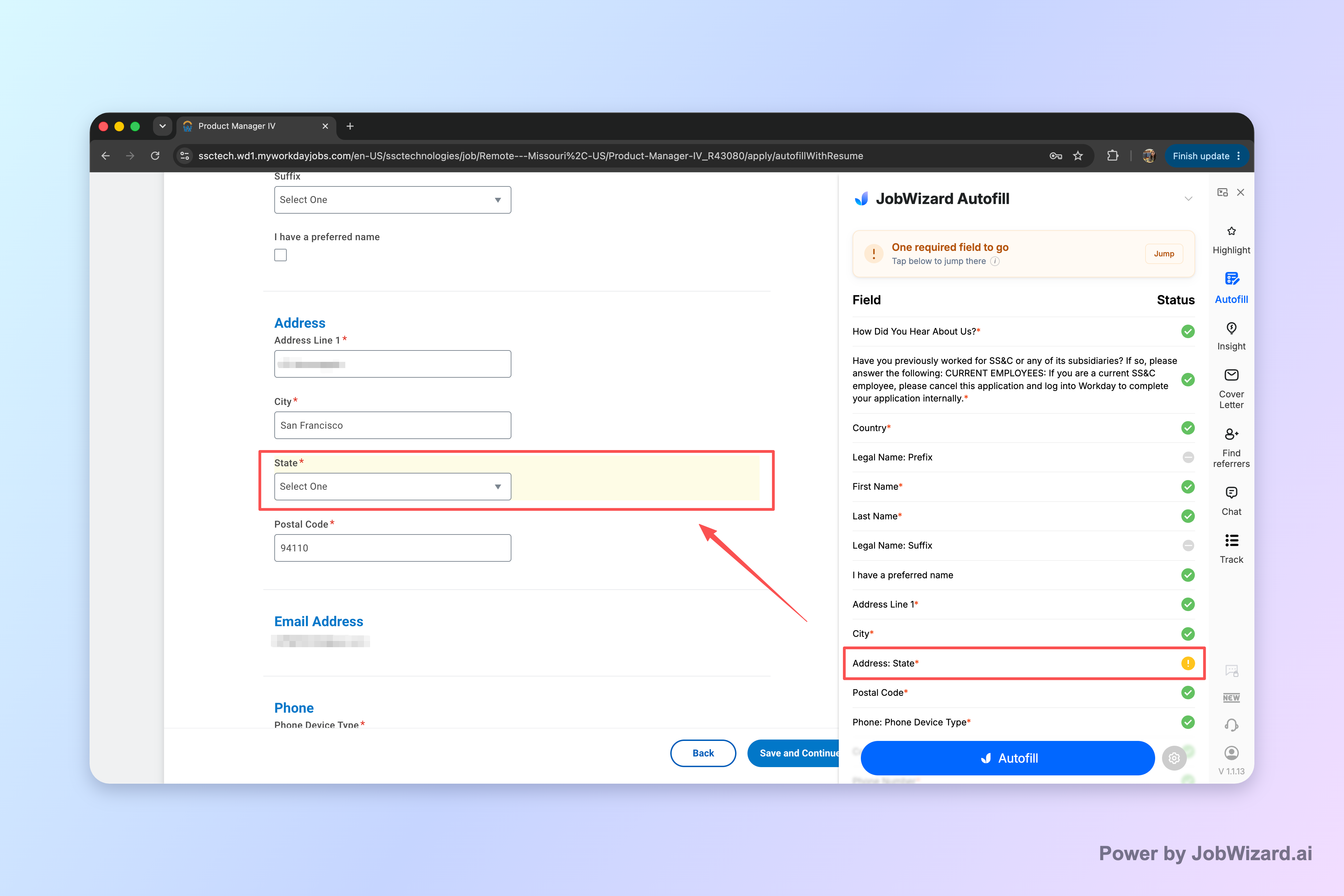
When you search for auto fill job applications, the most important distinction is whether the tool actually helps you prepare an application—or whether it tries to submit on your behalf without review. A responsible workflow is autofill + review-before-submit.
Here’s what that looks like in practice: the repetitive fields get filled quickly, and you still review the company-specific questions and anything that requires accuracy. JobWizard is designed around that pattern—autofilling repetitive fields and then having you review before you hit submit yourself.
- Autofill the repetitive fields: contact and standard form info that stays the same across applications.
- Review the judgment fields: sponsorship, salary/comp expectations, EEO-related selections, and custom questions.
- Submit yourself: you remain in control of what gets sent.
Real usage signals (autofill + review): JobWizard has supported 720,000+ applications submitted and 600,000+ autofill sessions run. On average, it autofills ~18 repetitive fields per application (typically 11–23), and the filled fields are meant to speed form completion while you review before submitting.
If you want to understand how this differs from “auto-apply” tools, read JobWizard vs LazyApply: A Practical Autofill-and-Review Showdown for Applications, then decide what workflow matches your comfort level.
How to auto fill job applications step-by-step (with a review checklist)
This is the workflow to use every time you auto fill job applications—fast enough to keep momentum, thorough enough to avoid the kind of mistakes that hurt your chances later.
Whether you’re applying across Workday, Greenhouse, Ashby, or Lever, the process can stay consistent. You’ll be using your own review to confirm the details that change from company to company.
- Start the application and let autofill populate repetitive fields: fill the parts that rarely change across applications.
- Scan the “company-specific” block: role title/level, location, and anything that ties to this employer’s posting.
- Verify sponsorship and legal/eligibility questions: don’t assume defaults are correct—confirm each response.
- Check EEO-related selections: these are often easy to miss because they appear in the middle of the form.
- Review salary/comp expectations (if asked): match your actual target or your agreed range.
- Answer custom questions in your own words: if the question asks about motivation, experience, or fit, treat it as content—not a field you rush.
- Final pass before submit: do a quick “preview all fields” read-through, then submit yourself.
If you apply in healthcare or other regulated environments, you may find it helpful to compare autofill versus a blind auto-apply style of workflow. See Nursing Job Applications: Autofill vs Blind Auto-Apply for a role-specific perspective on the kinds of questions that can’t be guessed.
Example checklist (copy/paste for your notes):
- Is my role title and location correct for this specific posting?
- Did autofill fill the right employer contact fields?
- Are sponsorship/eligibility responses accurate for this application?
- Did I review EEO selections and confirm they match my situation?
- Are custom questions answered in a way that matches the job description?
- Any formatting issues (dates, phone format, or address line breaks)?
This workflow is the practical answer to how to auto fill job applications without turning your application strategy into an error-prone speed contest.
Where autofill saves the most time (and what to double-check)
Auto fill job applications works best when your form includes many repeatable fields—then you can spend your time on the pieces that require context.
JobWizard’s real-world usage shows strong time savings in systems where forms are structured and repetitive. In particular, Workday is where it saves the most time: about 65% of applications submitted through it are on Workday, compared with 19% on Greenhouse, 12% on Ashby, and 4% on Lever.
What should you double-check on these platforms? In most postings, the biggest risk areas aren’t your name and contact info—they’re the parts that can change based on the job, your circumstances, or the employer’s compliance fields.
| Field type | Let autofill handle? | Why you still need to review |
|---|---|---|
| Contact details (name, email, phone) | Yes | It’s repetitive, but confirm format and the exact version (e.g., phone spacing, email spellings). |
| Address | Yes | Some forms require specific line structure—quick review prevents broken or misread entries. |
| Role-specific basics (department, level, job family) | Carefully | These are often tied directly to the posting; verify it matches the exact job you’re applying to. |
| Sponsorship / eligibility | No (final review required) | Small mistakes can invalidate your application or cause delays. |
| Salary/comp expectations | No (final review required) | It’s easy to carry an old answer forward—ensure it matches your plan. |
| EEO-related selections | No (final review required) | These questions are easy to skim past; confirm accuracy before submit. |
| Custom questions | No | They’re tailored to the employer’s needs; your answers need relevance. |
If you’re applying for marketing roles, the custom questions and experience-fit prompts often matter a lot. For a targeted view of how to approach autofill safely in that context, check Marketing Job Applications: Autofill vs Blind Auto-Apply.
The takeaway: use autofill for volume, but build in review time so your application stays accurate and job-specific.
Autofill vs “blind auto-apply”: what’s the real difference?
If your goal is auto fill job applications, you should still be thinking about your quality bar—because “faster” can sometimes mean “worse” if answers don’t get checked.
Here’s the core difference, in plain terms:
- Autofill + review-before-submit: repetitive fields are filled quickly; you review anything that’s sponsorship/salary/EEO/custom and submit yourself.
- Blind auto-apply: the app tries to submit without your full review of the exact answers and posting-specific questions.
Why this matters: job portals often include compliance and eligibility questions that can’t be guessed safely. Even if your repetitive fields are correct, a wrong response on one of those items can derail your application or create follow-up issues.
If you want a practical comparison of workflows and fit, use this as your decision question: Do you want to stay in the driver’s seat for answers? If yes, prioritize an autofill approach that supports review-before-submit—like the design JobWizard follows based on how users run autofill sessions.
For more perspective on how that looks compared to other tools, read JobWizard vs LazyApply: A Practical Autofill-and-Review Showdown for Applications.
Build an application “batch” system so you can apply faster without rushing
The fastest job seekers don’t just auto fill job applications—they batch work so review stays consistent and your attention doesn’t drift.
Try this structure for a focused application session:
- Batch 1: Create a reusable profile set: keep your standard contact and repeated form information clean and up to date.
- Batch 2: Apply to roles in groups: group jobs by posting type or company system (e.g., Workday-heavy employers vs Greenhouse-heavy).
- Batch 3: Review every application with the same checklist: sponsorship, EEO, salary/comp expectations, and custom questions.
- Batch 4: Personalize your highest-value answers first: pick the custom question(s) you can tailor most quickly and do those before the “final pass.”
This reduces cognitive load. Instead of deciding what to check from scratch each time, you follow the same review pattern—so your time savings from auto fill job applications don’t come at the cost of accuracy.
Quick workflow tip: if you notice recurring custom questions in a category (for example, “Why this role?” or “Tell us about a relevant project”), draft a few strong reusable templates—then tweak them per job before you submit.
And if you want a direct, role-specific viewpoint on what tends to change between applications in your field, start with Nursing Job Applications: Autofill vs Blind Auto-Apply and Marketing Job Applications: Autofill vs Blind Auto-Apply, depending on your target industry.
Ready to speed up the repetitive parts? Use JobWizard to auto fill job applications so the repetitive fields are handled quickly, then review the company-specific answers before you submit yourself.
Do this automatically with JobWizard
Skip the manual work — JobWizard's Smart Autofill handles this for you.
Auto fill job applications FAQ
Is auto fill job applications the same as auto-submit?
No. A safe workflow is autofill + review-before-submit, where repetitive fields are filled quickly and you review sponsorship/salary/EEO/custom questions before you submit yourself.
What kinds of fields should I let autofill job applications handle?
Let it handle repetitive, form-to-form items (like contact details and standard role basics). Then review anything that changes per company or needs judgment, like sponsorship, salary expectations, EEO-related selections, and custom questions.
Which application platforms does JobWizard autofill best?
JobWizard autofills across common systems, with Workday being where it saves the most time—about 65% of applications submitted through it are on Workday, 19% on Greenhouse, 12% on Ashby, and 4% on Lever.
How do I reduce mistakes when I auto fill job applications?
Use a repeatable checklist: confirm employer-specific items (company name, role specifics), verify sponsorship/EEO/custom questions, scan for formatting issues, and then do a final “preview all fields” read-through before submitting.
Will I still be the one submitting the applications?
Yes. The intent is to autofill repetitive fields to speed up your work, while you review and submit the applications yourself.
Want the step-by-step walkthrough? Start with “How to Autofill Job Applications (Step-by-Step with JobWizard)”, then use JobWizard in your next application batch to auto fill job applications—faster repetitive data entry, followed by your review before you submit.
Frequently Asked Questions
Autofill your next job application
JobWizard is a free Chrome extension that fills applications, tracks statuses, and optimizes your resume.