Job Referral Playbook: Use Referral Finder to Target the Right People and Ask for the Right Reason
A job referral can be the difference between “we’ll keep your resume on file” and real momentum. Use JobWizard’s Referral Finder to identify likely referrers and draft outreach you can review and personalize.
Free Chrome extension
Find someone to refer you — automatically
JobWizard spots employees at your target companies who can refer you, right from the job page.
A job referral that moves fast starts with the right ask—target people, then personalize
A strong job referral strategy isn’t about asking everyone—it’s about making a precise request to the most relevant employee contacts, with a reason that’s specific to their world. The moment you treat it like “spray and hope,” you lose the credibility that referrals depend on.
This guide gives you a practical workflow: where to find potential referrers, how to craft an outreach message that doesn’t feel generic, and how to follow up without burning goodwill. You’ll also see how JobWizard’s Referral Finder helps you organize employee matches and produce an outreach draft you can review before contacting anyone.
If you want the fastest path, start by mapping one target role, then build a short list of people you can ask with a truthful, specific connection. That foundation makes every message easier to write—and easier to accept.
Why “right people” matters more than “more messages”
Most people don’t reject a referral request because you’re unqualified—they hesitate because they don’t understand why you’re messaging them or how the connection is relevant. A targeted request removes friction for the referrer.
A good rule: if your message could be sent to anyone at the company, it’s probably too broad. Instead, reference a team, role, shared context, or a specific reason you’d be a fit.
What a job referral request should accomplish
- Clarify your target: which role (or team) you’re pursuing.
- Explain your relevance: 1–2 sentences connecting your experience to what they likely care about.
- Ask for a small next step: guidance, an introduction, or a quick confirmation of fit—never a demand.
Use Referral Finder to build a focused list (and draft outreach you can review)
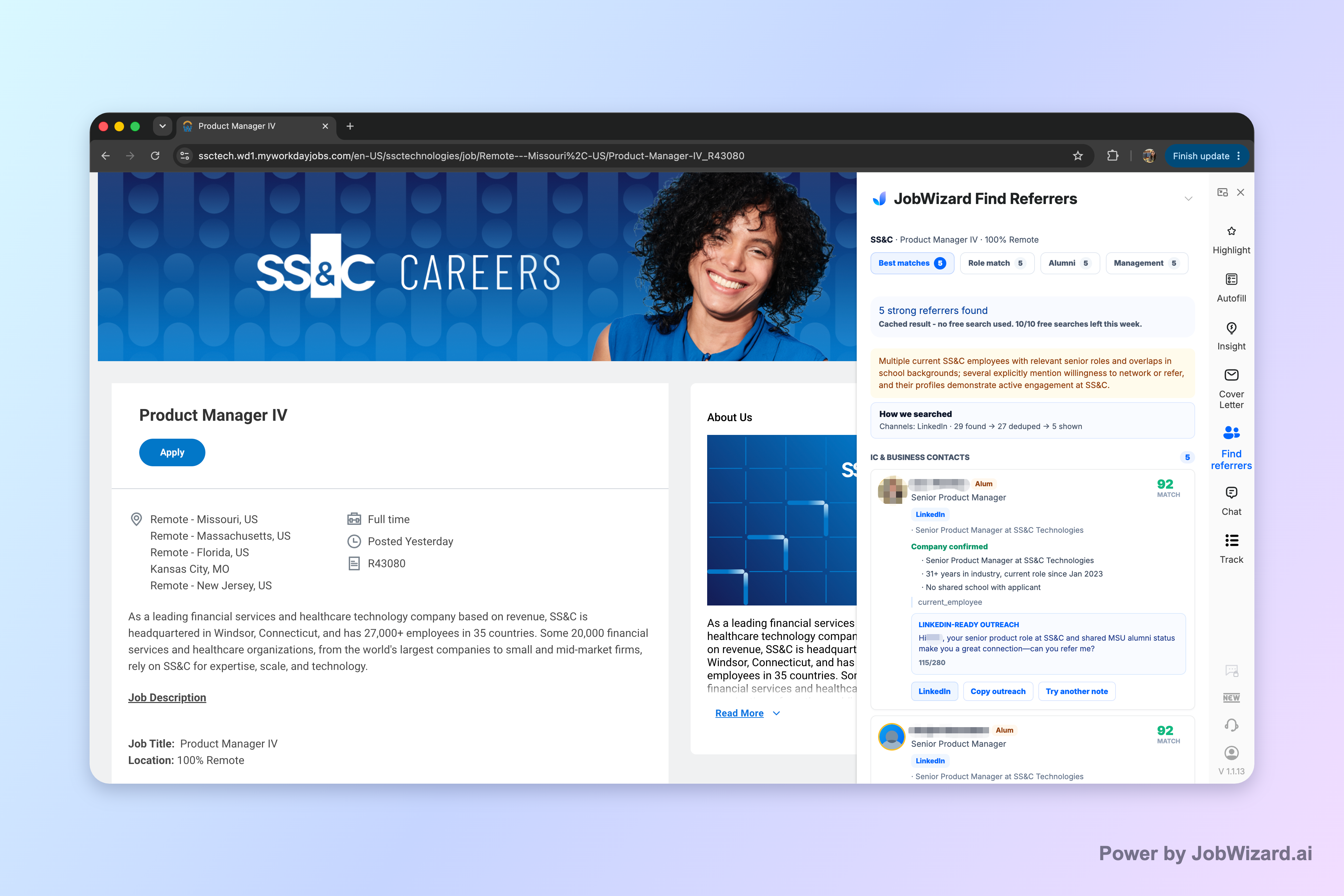
JobWizard’s Referral Finder helps you organize relevant employees by match type, including role and alumni context, and it prepares an outreach draft the user can review and personalize. The goal is simple: fewer guessy outreach messages, more targeted conversations.
Rather than collecting names and hoping they’re the right connection, you use the matches to decide whom to contact first. Then you adjust the draft so it sounds like you and includes a truthful, specific reason for reaching out.
Step 1: Start with one job you actually want
Before you message anyone, lock your target: job title, department (if known), and a short list of the top skills you want to highlight. Referral requests go better when the referrer can immediately see the “shape” of what you’re aiming for.
Step 2: Use the matches to choose who to ask
Referral Finder organizes employees by match type, including role and alumni context. Use that organization to pick a short list you can genuinely justify—someone who has a real, readable connection to your background or the role.
Important limitation: JobWizard can’t guarantee contact accuracy or response success, so you still need to validate your assumptions with your own knowledge before you send.
Step 3: Review the outreach draft—and personalize it before contacting anyone
Referral Finder prepares an outreach draft the user can review and personalize. Your job is to make it truthful and specific: add your actual reason for reaching out, and match the content to the referrer’s context.
- Don’t overclaim: keep the connection honest and concrete.
- Be specific about fit: mention a relevant achievement, project, or tool.
- Ask for a next step: what you want them to do (intro, guidance, or opinion).
Another key limitation: you choose whom to contact and must add a truthful, specific reason for reaching out. A referral request works when the referrer understands why you’re reaching out—not when you rely on automation.
Write a job referral request that feels helpful, not transactional
A job referral message should make it easy for a referrer to decide whether you’re worth supporting. If they can’t quickly understand your fit, they won’t want to get involved.
Use this structure for your outreach draft, then rewrite it in your own voice. Keep it short; the referrer can skim it in under a minute.
Message structure you can copy (and customize)
- One-line purpose: why you’re messaging them (target role + brief context).
- Two lines of relevance: your most relevant experience, achievement, or project.
- Truthful connection: why you chose them specifically.
- The ask: a small next step (introduction or guidance).
- Close politely: thank them and offer to share your resume.
Example outreach (fill in your details)
Subject: [Role] — quick question + referral guidance?
Hi [Name]—I’m applying for the [Role/Team] at [Company]. I noticed we share [alumni/past overlap/team context], and I’m reaching out because my background in [relevant skill/experience] seems like it maps well to what that team needs.
In the past, I [specific achievement with numbers if you have them—keep it honest], and I’m especially interested in [one role-relevant focus]. If you think I’d be a fit, would you be open to an introduction or guidance on the best way to approach the role?
Thanks so much for your time—happy to share my resume or a short summary if helpful.
This approach avoids sounding entitled. You’re offering a clear reason and a respectful next step.
Follow up like a professional: timing, tone, and a “close the loop” plan
Most referral requests fail because people follow up poorly—either too often, or with a guilt-based tone. A smart follow-up protects your relationship and increases clarity.
Your follow-up plan should be consistent: one reminder, then a graceful close. Don’t keep reopening the thread indefinitely.
Follow-up rules that reduce awkwardness
- Wait before following up: give them time to read and decide.
- Remind, don’t pressure: one sentence that echoes your role target and ask.
- Offer an easy next step: “If it’s helpful, I can send a short resume summary.”
- Close the loop: after a second attempt, thank them and stop—keep it respectful.
Follow-up message example
Hi [Name]—just bumping this in case it got buried. I’m still very interested in the [Role/Team] and would appreciate any guidance you’re comfortable sharing. If an intro is easier, I’m happy to send my resume and a brief summary.
Thanks again for your time, [Your Name].
Turn referrals into momentum: align your application and your outreach
A job referral is most effective when it supports—not replaces—your application. The referrer can amplify your chances, but they can’t fix gaps in your resume or your positioning.
Before you reach out, make sure your application materials clearly match the role. Then use your messages to reinforce the same narrative.
Checklist to align your resume and referral request
- Mirror the role language: use the same keywords and responsibilities described in the job posting.
- Lead with proof: pick 1–2 accomplishments that demonstrate you can do the work.
- Keep your ask consistent: if you asked for an intro, your follow-up should remain an intro request or guidance—not a new demand.
- Respect the sponsorship reality: some referral asks will never turn into an internal introduction. Plan to apply and follow up normally either way.
Where JobWizard fits (and where it doesn’t)
JobWizard’s Referral Finder organizes relevant employees by match type and prepares an outreach draft you can review and personalize. You still decide whom to contact, and you must add a truthful, specific reason for reaching out.
Also, note the limitation: do not assume contact accuracy or response success. Use the tool as an outreach organizer and drafting assistant—not as a promise of outcomes.
Make it easier with your next clicks
If you want more targeted guidance for different stages of outreach, these resources pair well with the workflow above:
- How to Network and Secure Job Referrals During the Hiring Off-Season for a Faster Offer
- How to Get a Referral at Any Company Without Connections
- Step-by-Step Tips to Secure LinkedIn Referral Requests in 2026
Remember: a referral request works when it’s specific, respectful, and rooted in a truthful connection—not when it’s mass-sent or vague.
Do this automatically with JobWizard
Skip the manual work — JobWizard's Smart Autofill handles this for you.
FAQ: Job referral requests, wording, and what to expect
What should I include in a job referral request message?
Include a clear reason you’re reaching out, the specific role (or team) you’re targeting, and 1–2 sentences connecting your background to why you’d be a strong fit. Then ask for the next step (often an introduction or guidance) without sounding entitled.
How do I pick who to ask for a job referral?
Start by targeting employees whose context matches your goal—same department/team, relevant alumni or past employers, or a role that overlaps with yours. If you can, choose someone you can reference with a truthful, specific connection and a short, job-relevant explanation.
Will a referral guarantee I get hired?
No. A referral can improve your odds by getting your name in front of the right people, but it doesn’t guarantee an interview or offer. You still need a strong application and follow-through.
How should I personalize the outreach draft I receive?
Rewrite the first lines so they sound like you, add a concrete detail (project, class, tool, or achievement) that matches the role, and include a truthful reason for contacting that specific person. Keep it brief, respectful, and focused on the next step you’re asking for.
Ready to turn your job referral outreach into a repeatable workflow?
Start by using JobWizard’s Referral Finder to organize relevant employees by match type and generate an outreach draft you can review and personalize. Then choose whom to contact with a truthful, specific reason—and send a message that makes the referrer’s decision easy.
Create your JobWizard account to build a targeted job referral outreach list and draft
Frequently Asked Questions
Find someone to refer you — automatically
JobWizard spots employees at your target companies who can refer you, right from the job page.