How to Respond to a Recruiter on LinkedIn: 12 Message Templates That Get Replies
Learn how to respond to a recruiter on LinkedIn with clear, professional messages. Use proven templates for timing, questions, and follow-up.
Free Chrome extension
Find someone to refer you — automatically
JobWizard spots employees at your target companies who can refer you, right from the job page.
How to respond to a recruiter on LinkedIn: act fast, stay specific, and make it easy to reply
Learning how to respond to a recruiter on LinkedIn is mostly about speed, clarity, and giving them just enough information to move forward. Your goal isn’t to “win” the recruiter—it’s to help them confirm fit and route your application to the next step.
In this guide, you’ll get message templates you can copy, plus a simple workflow for when to accept, ask questions, or politely decline. You’ll also see how a tool like Referral Finder can help you craft outreach that’s accurate and personalized before you message anyone else.
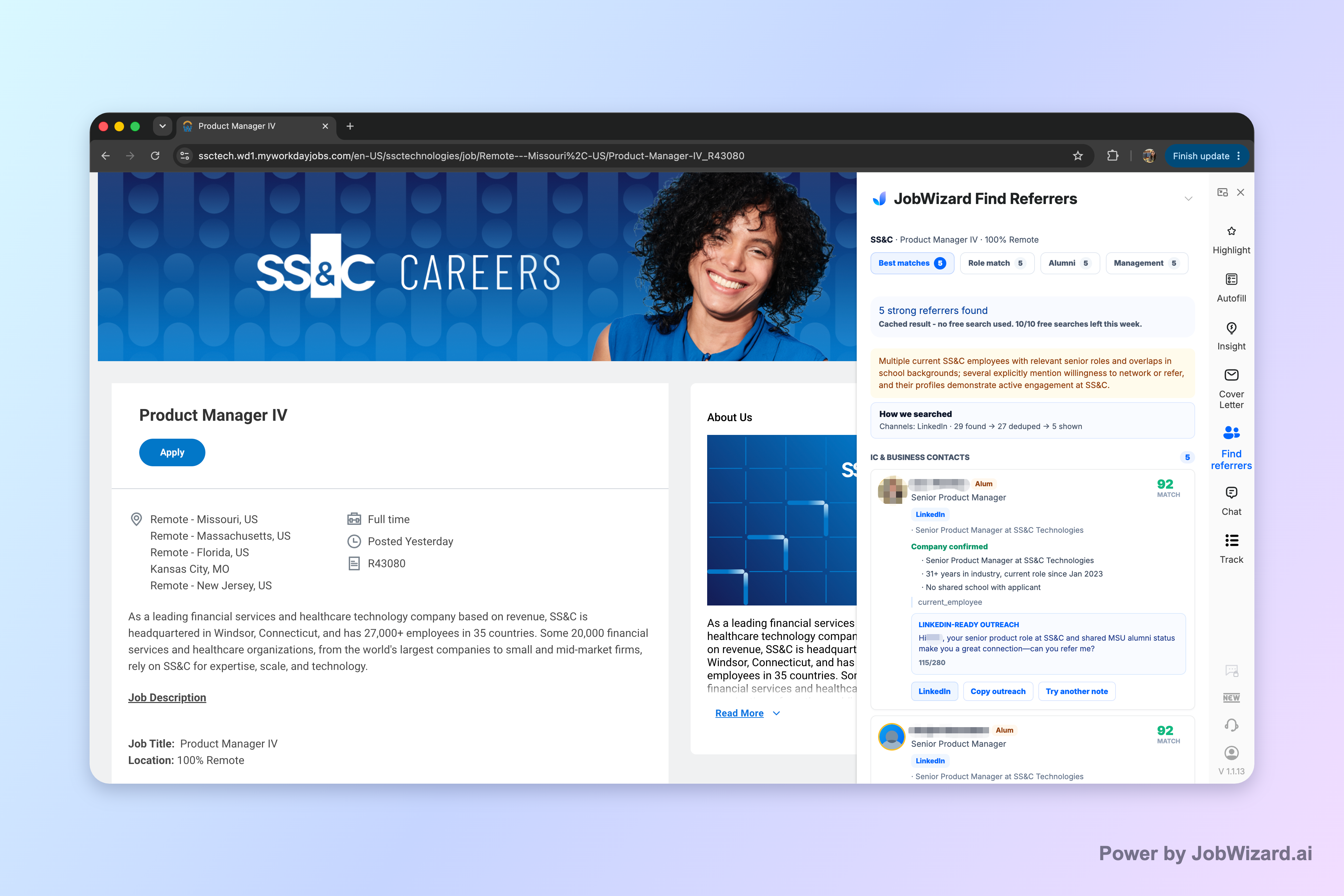
Referral Finder can organize relevant employees and prepare an outreach draft you can review and personalize, so you’re not sending generic “please refer me” notes.
Reply structure that works: opening line, fit, and one clear next step
A strong response follows a predictable structure: thank them, confirm why you fit, then make the next step obvious. That makes it easier for a busy recruiter to reply with times, links, or next steps.
1) Opening: acknowledge the message and the role
Start with appreciation and reference the role name (or the key phrase they used). If they didn’t include details, ask a quick clarifying question.
- Example: “Thanks for reaching out about the [Job Title] role at [Company]. I’d love to learn more.”
- Example: “Thanks for contacting me—could you share the job link and a couple of responsibilities you’re prioritizing?”
2) Fit: 2–3 specifics (not your whole resume)
Recruiters respond to messages that show you understood the role. Mention the most relevant experience, tools, or outcomes from your background—briefly and truthfully.
- Example: “In my recent role, I owned [X] and worked closely with [Y], using [tool/skill].”
- Example: “I’ve supported [scope] and have hands-on experience with [tech/process] that matches what you described.”
3) One next step: answer their question or propose a time
Don’t end with “Let me know.” Instead, ask for something concrete: a call time window, a job link, or whether they want a resume update or portfolio.
- If they ask for availability: propose 2–3 time windows with your time zone.
- If they ask for interest: confirm interest and ask what the interview process looks like.
- If they didn’t ask anything: ask what stage they’re hiring for and what they’re looking for most.
Choose your scenario and use the right template
The best way to respond to a recruiter on LinkedIn is to match your message to what they asked you. Use these templates as starting points and edit for accuracy.
Template A: They reach out with the role and ask if you’re interested
Copy/paste: “Hi [Name]—thanks for connecting and reaching out about the [Job Title] role at [Company]. Yes, I’m interested. I’ve worked on [relevant experience] and have experience with [skill/tool]. What are the next steps—should I apply via the careers page or are you collecting resumes directly?”
Template B: They ask to schedule a call
Copy/paste: “Thank you for the invitation, [Name]. I’d be happy to chat. I’m available [Day] at [time]–[time] [TZ], and also [Day] at [time]–[time] [TZ]. If those don’t work, feel free to suggest a couple of windows that fit your schedule.”
Template C: They don’t ask anything—just introduce themselves
Copy/paste: “Hi [Name], thanks for reaching out. I’m open to roles like [Job Title] that involve [scope]. Could you share a bit more about what you’re hiring for right now (team goals or must-have skills)? If it’s a fit, I’d be glad to send an updated resume or schedule a quick call.”
Template D: You’re interested, but you need clarity before moving forward
Copy/paste: “Thanks for reaching out, [Name]. I’m interested in the [Job Title] role. Before I confirm availability, could you clarify [1–2 items you genuinely need—e.g., location/time zone, key responsibilities, interview timeline]? That will help me determine the best next step.”
Template E: You’re not interested in the specific role
Copy/paste: “Hi [Name]—thank you for considering me for the [Job Title] role. At this time, it’s not the right match for my background and career direction. If you have other openings that align more with [your target area], I’d appreciate it if you’d share them. Wishing you the best with your search.”
Template F: They ask for a resume or specific details
Copy/paste: “Absolutely. My resume is attached here / linked: [link]. The details that are most relevant to your request are: [brief bullets: tool/years/major project]. Please let me know if there’s anything else you’d like me to include.”
Template G: You applied already and want to confirm status
Copy/paste: “Hi [Name]—thanks for messaging. I applied for the [Job Title] role on [date] (application ref: if you have it). I remain very interested. Is there anything I can provide that would help your team review my application (e.g., a quick summary of relevant experience)?”
Template H: You have a question about the role (without sounding demanding)
Copy/paste: “Thanks for reaching out, [Name]. I’m interested in the role—one question: what does success look like in the first 60–90 days for this position? I’d like to make sure my background aligns before we proceed.”
Timing and follow-up: what to send when they don’t reply
Recruiters are fast responders—when they have context. If they don’t reply, a respectful follow-up keeps you visible without spamming.
How soon to reply
If you’re interested, respond within 24 hours when possible. If you need more time, send a short acknowledgement so they know you saw the message.
- Quick acknowledge: “Thanks for reaching out—I'm reviewing the role details now and will get back to you shortly.”
- Busy day reality: avoid long delays without any message, especially if the role is active.
Follow-up cadence that’s professional
If you don’t hear back, follow up after 3–5 business days. Keep it brief and tie it to the job and next steps.
Follow-up template: “Hi [Name]—I wanted to follow up on my message about the [Job Title] role. I’m still very interested, and I’d appreciate any update on next steps or timing when you have a moment. Thanks again!”
What to do if you get a message that’s unclear
When a recruiter’s note is vague, ask one targeted question instead of guessing. Good questions sound like you’re helping them evaluate you, not trying to “interrogate” them.
- Clarity question: “Could you share the job link and the top 2–3 responsibilities you want the new hire to handle?”
- Process question: “What’s the interview process and timeline for this role?”
Common mistakes when you respond to a recruiter on LinkedIn (and better alternatives)
Most weak responses aren’t “bad people”—they’re missing context or ask too much. Here are the fixes that consistently improve reply rates.
Mistake 1: Sending a generic “I’m interested” with no fit
Recruiters want a reason to believe you match the role. Add two specifics from your background and keep the rest short.
- Better: “I’m interested because I’ve supported [scope] and used [skill/tool] that matches what you described.”
Mistake 2: Asking for a referral immediately
Cold referral requests can feel abrupt. Instead, start with fit and intent—then ask if there’s an employee contact who could share context about the role (and only after you’ve shown relevance).
If you decide to message someone else, use Referral Finder’s approach: it prepares an outreach draft for you to review and personalize, and it organizes relevant employees by match type and alumni context.
Mistake 3: Overexplaining your entire career
Long walls of text are harder to read quickly on LinkedIn. Use bullets, short lines, and one clear question at the end.
- Better: 2–3 lines on fit + one question about next steps.
Mistake 4: Ignoring their questions
If the recruiter asks availability, answer it. If they ask for a specific document, provide it. Your response should reduce their work, not add to it.
- Better: “I can do [windows]. If helpful, I can also send [requested item] today.”
Mistake 5: Responding with uncertainty (“Not sure if I qualify”)
Doubt isn’t always bad—but vague uncertainty slows decisions. Reframe: confirm interest, then tie your experience to the role and ask what they prioritize.
- Better: “I believe my experience in [X] aligns well. To confirm fit, what skills matter most for success in this role?”
Do this automatically with JobWizard
Skip the manual work — JobWizard's Referral Finder handles this for you.
FAQ: how to respond to a recruiter on LinkedIn
How quickly should I respond to a recruiter on LinkedIn?
Aim to reply within 24 hours if you’re interested. If you can’t, send a short note acknowledging the message and saying you’ll follow up after reviewing the role details.
What should I say when a recruiter asks for a brief call?
Thank them and confirm your availability with 2–3 specific time windows (including your time zone). If you prefer async, ask whether you can answer a few questions via message first.
How do I respond if I’m not interested in the role?
Be polite and brief: thank them, say you’re not a fit for that specific role, and (optionally) ask if they have other openings more aligned with your background.
Should I ask about salary or work authorization in my first reply?
You can ask early if the recruiter includes those details or if it’s essential for you to know before moving forward. Otherwise, ask after you’ve confirmed fit—e.g., once there’s clarity on the interview process.
What’s a good follow-up message if I don’t hear back?
Send a concise follow-up after 3–5 business days: remind them you’re still interested, reattach any requested info (or confirm you sent it), and ask about next steps or timing.
Ready to respond with confidence? If you’re sending messages, personalize them first—then reply quickly. JobWizard helps you move faster during job applications by autofilling repetitive fields so you can review the sponsorship, salary, EEO, and custom questions before you submit.
Start with your next LinkedIn recruiter message using the templates above, and then pair it with your job application workflow in JobWizard so you can apply consistently without losing control of the details.
Frequently Asked Questions
Find someone to refer you — automatically
JobWizard spots employees at your target companies who can refer you, right from the job page.