How to Get ChatGPT to Tailor Resume to Job Description Without Keyword Stuffing: A Prompt Workflow
Want to know how to get ChatGPT to tailor resume to job description accurately? Use a prompt workflow that extracts keywords and rewrites your experience with evidence you can verify.
Free Chrome extension
See your resume's match score for any job
JobWizard compares your resume to each job description and shows the exact keywords to add — free.
Start with the goal: tailor for the job description while staying truthful
If you’re trying to figure out how to get chatgpt to tailor resume to job description, the fastest way to improve results is to treat tailoring like a “evidence-backed rewrite,” not a keyword swap. The job description tells you what to emphasize; your resume supplies the proof.
In practice, you want two outputs: (1) a structured breakdown of what the role asks for and (2) a rewritten section where each change you make is supported by something real from your experience. This keeps your resume from drifting into exaggeration.

Before you prompt ChatGPT, you should extract the role’s exact themes so you’re not guessing. JobWizard can organize the job description into keywords, role responsibilities, and qualifications so you can review requirements more systematically.
Define your “truth boundary” before you ask for a rewrite
Tailoring fails when it creates content you can’t defend. Add a rule to every prompt: ChatGPT must only use facts you provide, and it must flag anything it can’t support.
- Rule 1: “If I didn’t provide evidence for a requirement, mark it as missing.”
- Rule 2: “Never invent metrics, employers, tools, certifications, or scope.”
- Rule 3: “Produce an edits list I can verify line-by-line.”
Extract the job’s keywords and requirements, then turn them into prompt inputs
To tailor efficiently, you need the job description broken into categories ChatGPT can follow. When you know what you’re targeting, your prompts become specific instead of generic.
Use a JD “ingredient list” (copy/paste this into your prompt)
Create a short “ingredients” section from the job description. If you don’t want to manually extract everything, you can still do it quickly by focusing on patterns.
- Responsibilities: 4–8 bullets of what the person will do day to day.
- Qualifications: must-have and preferred skills/requirements.
- Keywords: tools, methodologies, domain terms, and role verbs (e.g., “own,” “build,” “optimize,” “analyze”).
Prompt template #1: JD breakdown + mapping keys
Use this when you want ChatGPT to structure the job description for you, which then powers the rewrite step.
Prompt: “Here is a job description. Extract (1) responsibilities, (2) qualifications, and (3) keywords/ATS phrases. Then group keywords into themes. Output in a table with columns: Theme, Keywords/Phrases, Why it matters (from the JD), Evidence I should look for in my resume.”
Important: keep this step focused on extraction and grouping. Don’t ask for the final rewrite yet.
Run a skills gap diagnosis, then rewrite only what you can support
Once you know what the job wants, the next step is identifying your “expression gaps”—the differences between your experience and how the role phrases it.
If you use JobWizard, its Insight feature can compare your selected resume with the current job description and produce an overall assessment, match score, and improvement suggestions. It also turns the JD-based diagnosis into an editable resume revision draft that you review for accuracy.
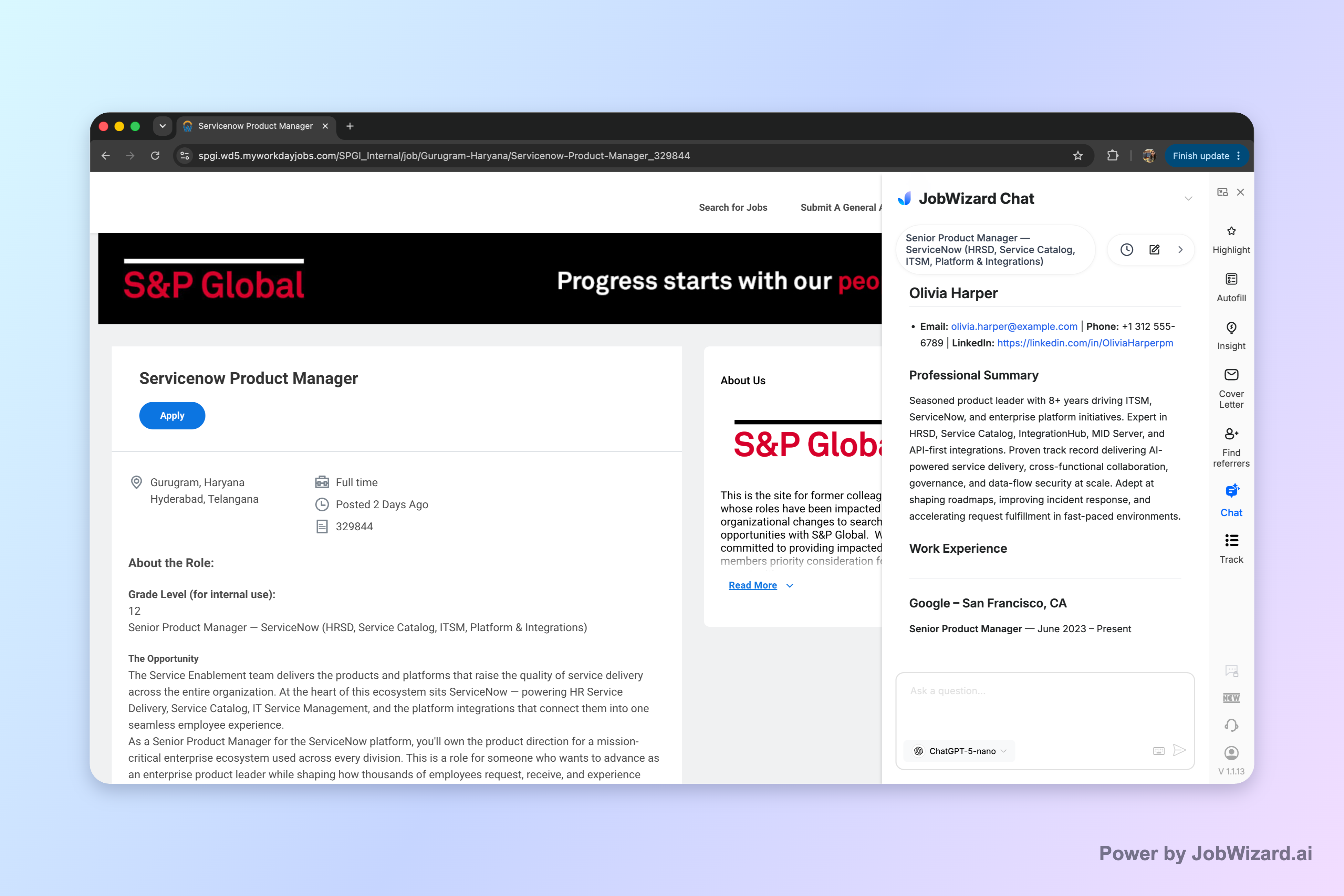
After the diagnosis, treat the output as a draft starting point: ChatGPT can refine wording, but you still verify every suggested change against your real experience.
Prompt template #2: map your experience to the role
This is the step that prevents keyword stuffing. You’re asking ChatGPT to connect your bullets to the job’s requirements.
Prompt: “I’m targeting this job description. Here’s my current resume content (paste relevant sections). For each theme from the JD extraction table, do a mapping:
1) Supported requirements: list my bullets that match (quote short fragments).
2) Expression gaps: where I match in meaning but not in keywords/phrasing.
3) Missing requirements: requirements with no evidence from my resume (label ‘missing’ and explain what evidence would be needed).
Finish with a prioritized list of the top 5 edits to make next.”
Prompt template #3: rewrite bullets with verification-first constraints
Now you can ask ChatGPT to produce a tailored rewrite, but you’ll force it to keep the rewrite honest.
Prompt: “Rewrite my resume bullets to better match the job description while staying truthful to my experience. Constraints:
- Only use facts I provided.
- Do not invent tools, results, certifications, or scope.
- If a bullet would require new evidence, mark it as ‘needs verification’ or ‘missing evidence’ instead of rewriting as if true.
Output:
1) For each target theme, provide 2–3 revised bullets.
2) After each theme, include a ‘Verify these details’ checklist for me.”
What “good” tailored wording looks like
Your goal isn’t to copy the job description word-for-word. It’s to align your phrasing so a recruiter can see the match quickly. Look for where you can:
- Swap to role verbs you already do (“analyzed,” “built,” “implemented,” “coordinated”).
- Name the relevant tools only if you truly used them.
- Match the scope (team size, project type, stakeholder group) using your real context.
And where you can’t support a requirement, you don’t rewrite around it—you rewrite honestly and adjust your emphasis.
Use a “final QA” pass so your tailored resume is review-ready
Even strong AI output needs a human final check. This is where you keep the resume accurate and recruiter-friendly.
Verification checklist (run it before you submit)
- Every metric? Confirm any numbers are yours (and represent the real outcome).
- Every tool name? Make sure you used it in that role or project.
- Every responsibility? Confirm the “why this matches” is true from your experience.
- Every “missing” item? Make sure ChatGPT labeled gaps as missing instead of pretending you have the experience.
Keep formatting stable while you tailor content
Tailoring changes content; it shouldn’t create formatting chaos. Maintain consistent section titles, clear bullet structure, and readable spacing so your updates land cleanly for both humans and ATS parsing.
If you see your resume starting to bloat, shrink it back down to the most job-relevant bullets per role and keep the rest of the experience succinct.
Do this automatically with JobWizard
Skip the manual work — JobWizard's Smart Autofill handles this for you.
FAQ: how to get chatgpt to tailor resume to job description
How do I prompt ChatGPT to tailor my resume to a job description (without making stuff up)?
Paste the job description and add a rule like: “Only use experiences I provide; if a requirement isn’t supported, say ‘missing’ and suggest what I could add.” Then ask it to rewrite bullets using your provided facts (metrics only if you share them) and produce a “verify before submit” checklist.
What’s the best structure for a tailored resume prompt when I’m targeting ATS keywords?
Use a three-part prompt: (1) JD extraction (responsibilities, qualifications, keywords), (2) mapping (which of your bullets support each requirement), and (3) rewrite (2–3 revised bullets per role area). End by requiring an “ATS keywords preserved, but only if truthful” constraint plus a final skills gap list.
Should I ask ChatGPT for a match score or ATS prediction?
You can ask for a quality check, but treat any “match score” as non-guaranteed. The safest approach is to use ChatGPT to identify expression gaps and draft edits you can verify, then manually confirm that every change is accurate to your experience before submitting.
How do I handle requirements I don’t fully meet when tailoring my resume with ChatGPT?
Tell ChatGPT to label them as “missing” and to avoid inventing experience. Ask it to propose (a) honest rephrasing of adjacent experience, (b) transferable skills language, and (c) a short gap-filling plan (projects to highlight, training to cite, or where to emphasize “working knowledge” appropriately).
Can JobWizard help with tailoring when I’m using ChatGPT prompts?
Yes. JobWizard can organize a job description into structured keywords, responsibilities, and qualifications, and it can generate an editable resume revision draft based on a resume-vs-JD diagnosis. Use that output to guide your ChatGPT prompt inputs, then review every suggested change for accuracy before submitting.
JobWizard CTA: tailor faster with JD highlights and an editable resume draft you review
If you want a cleaner workflow for how to get chatgpt to tailor resume to job description, start by extracting the role’s requirements, then rewrite with evidence you can verify. Try JobWizard to turn the job description into structured keywords/responsibilities/qualifications and generate an editable resume revision draft—then review the changes before submitting.
Frequently Asked Questions
See your resume's match score for any job
JobWizard compares your resume to each job description and shows the exact keywords to add — free.