Best LinkedIn Extensions for Job Seekers: How to Find Referrals and Personalize Outreach
The best LinkedIn extensions for job seekers help you move faster without skipping the parts that matter—like personalized outreach. Here’s how Referral Finder streamlines referral discovery and draft messaging.
Free Chrome extension
Find someone to refer you — automatically
JobWizard spots employees at your target companies who can refer you, right from the job page.
If you’re searching for the best linkedin extensions for job seekers, you’re probably trying to solve two problems at once: finding the right people to contact and writing outreach messages that don’t sound generic.
Most extensions promise “more applications” or “auto-message” behavior, but the real leverage usually comes from better targeting and a faster way to draft messages you can still personalize. In this guide, we’ll focus on what matters for job seekers in the US: extensions that help you discover potential referrers and prepare outreach drafts you review before contacting anyone.
The best LinkedIn extensions for job seekers start with referral discovery you can review
The most useful extensions for job seekers reduce the time you spend hunting for the right employees—and help you draft outreach that you actually approve. If you want referrals, you don’t just need more visibility; you need a clear list of who to message and a message you can confidently tailor.
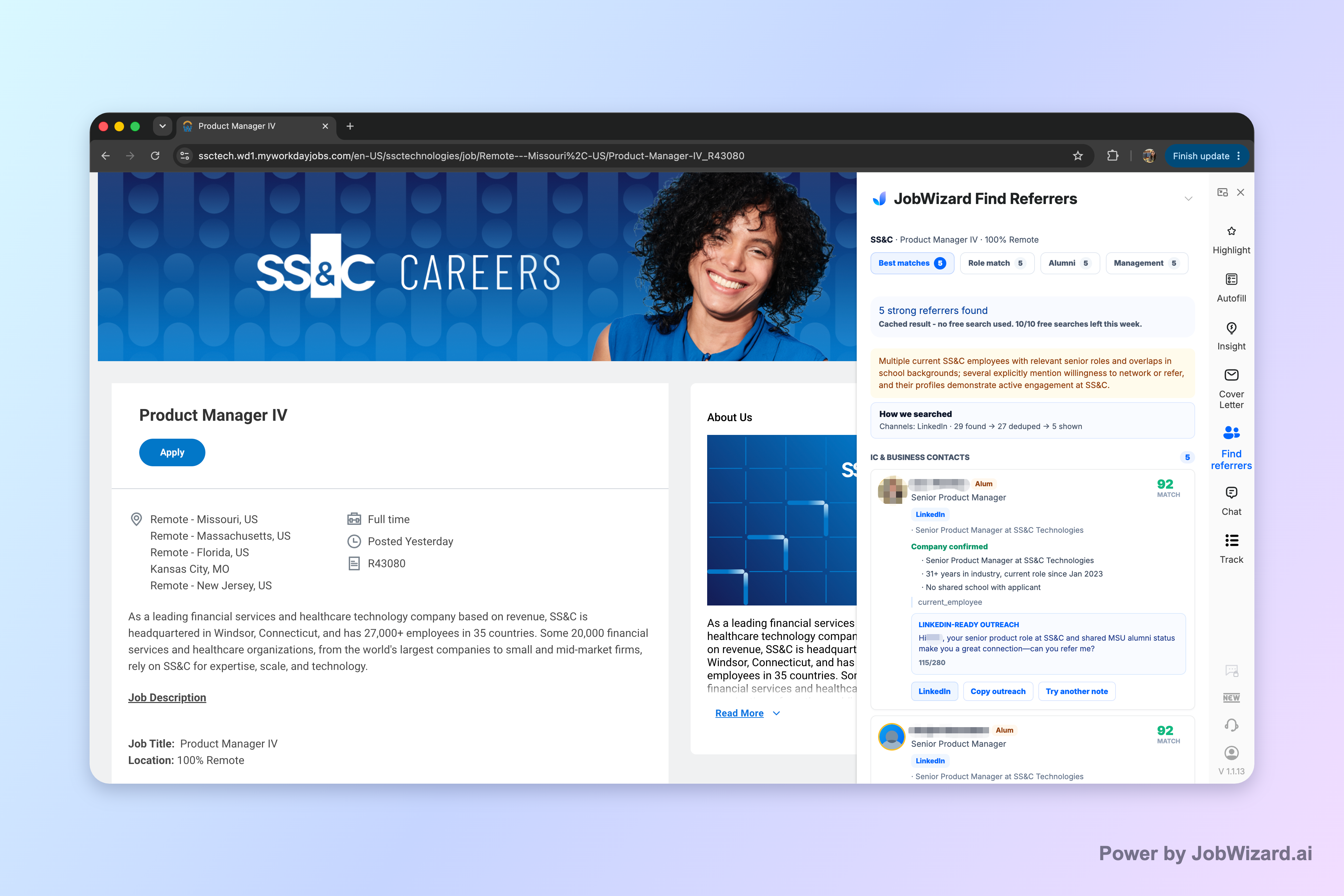
That’s where JobWizard’s Referral Finder fits the “best LinkedIn extensions for job seekers” goal: it organizes relevant employees by match type, including role and alumni context, and prepares an outreach draft you can review and personalize.
Why “referral fit” beats “random networking”
When people reach out with a generic “I’m applying—please refer me,” the message often gets ignored because it doesn’t show connection or clarity. A good referral workflow makes it easier to align on three things: relevance, credibility, and a specific reason for contacting that person.
Referral Finder is designed around that workflow. Instead of dumping contacts in a long list, it groups matched employees by type, so you can decide who’s most likely to understand your angle—and who you can contact with a truthful, specific reason.
Workflow: what you do before you message anyone
To get the most value from any referral-focused extension, follow a simple process that keeps you in control:
- Scan match types to identify employees connected to the role or with relevant alumni context.
- Choose the person(s) you actually want to contact based on your goal and connection to the company.
- Review the outreach draft and edit it so it sounds like you.
- Add a truthful, specific reason for reaching out (how you found them and what you’re asking for).
- Send only after personalization—no copied-and-pasted requests.
Key limitation: Referral Finder prepares an outreach draft and organizes matched employees, but it does not guarantee referral outcomes or response success. You choose whom to contact and must add a truthful, specific reason for reaching out.
How to evaluate a LinkedIn extension so you don’t waste time
Not every “LinkedIn extension” is equally helpful for job seekers. The best approach is to evaluate tools based on whether they improve your targeting and writing workflow—while still requiring your review before any outreach or application actions.
Here are practical criteria you can use when you’re comparing options (including AI-powered tools) and deciding what qualifies as one of the best linkedin extensions for job seekers for your situation.
Look for these features
- Structured results: Does the extension organize people in a way that helps you decide who to contact next?
- Drafts you review: Can you read, edit, and personalize outreach before you send it?
- Clear personalization prompts: Does it help you include the “why you” details instead of encouraging copy-paste?
- Human control: Does your workflow still require you to choose recipients and craft a truthful reason for outreach?
- Scope clarity: Does it focus on a specific job-search step (like referral discovery), rather than trying to do everything at once?
Be cautious about “guarantees” and assumptions
It’s tempting to pick extensions that imply results—more responses, guaranteed referrals, or instant wins. For job seekers, that’s not realistic and it can cause ethical or professional issues if you send inaccurate or misleading messages.
Even with tools that assist with drafts or organization, always treat the output as a starting point. Confirm the details you mention and make sure your outreach is honest and specific to the person you’re contacting.
Referral Finder in practice: a complete outreach example you can copy (and customize)
If you want to see what “personalize what you review” looks like, use a real outreach draft workflow. Below is an example message style you can adapt after you generate or edit an outreach draft.
Goal: Request informational guidance and confirm whether a referral is appropriate—without asking for something vague.
Example LinkedIn message (customizable)
Subject/first line: Quick question about [Team/Role] at [Company]
Hi [Name]—I’m applying for the [Role Title] position at [Company]. I saw your background in [specific area/team] and noticed [one specific, truthful connection: alumni context / shared interest / relevant project].
I’m aiming to bring experience in [relevant skill/impact] to help with [specific need related to the role]. If you’re open to it, would you be comfortable sharing guidance on what would make a candidate strong for the team?
If referral is possible and appropriate, I’d really appreciate your consideration. Thanks for your time—either way, I appreciate the insight.
What to replace (so it’s not generic)
- Role-specific clarity: name the role title and one relevant requirement.
- Connection truth: mention only what you can verify (shared alumni, team overlap, a post, a project).
- Specific ask: ask for guidance first, then clarify referral if you want.
- Your personal angle: 1–2 lines about your fit, not your full resume.
Rule to follow: The extension can prepare drafts, but you’re responsible for adding a truthful, specific reason for reaching out and choosing whom to contact.
Where extensions fit best in your job search pipeline (and where they don’t)
The best best linkedin extensions for job seekers are not magic; they’re workflow accelerators. Put them where they reduce the most repetitive effort and where you still have to make decisions.
Referral discovery and message drafting are a strong match for extensions because they help with repeatable tasks: finding relevant people, organizing possible matches, and creating a first-draft message you can refine.
Best-fit workflow stages
- Pre-application outreach: Identify potential referrers before you submit.
- Message drafting: Use an outreach draft to speed up writing while keeping personalization.
- Target selection: Choose which contacts you’ll actually message based on match type and relevance.
- Final review: Replace any vague wording with your specific reason and the role’s details.
Stages where you should slow down
- Sponsor/EEO/salary or policy-sensitive details: If any content is involved, verify it yourself and don’t assume it’s correct.
- Any claim you can’t verify: Never state that someone “will refer you” or “will reply.” Treat outreach as a request, not a guarantee.
If you’re also working across application platforms, remember that the goal is consistent: autofill or draft acceleration should be paired with your review-before-action behavior, not blind sending.
Quick comparison: what “best” looks like for job seekers seeking referrals
When your objective is referrals through LinkedIn, your “best extension” should help you find relevant people and produce drafts you can tailor—not just collect contacts.
Below is a simple comparison framework to judge referral-focused extension value. (This article keeps the comparison focused on capabilities you can apply immediately.)
| What you need for referrals | Why it matters | How Referral Finder supports it |
|---|---|---|
| Organized matches | Helps you quickly decide who to contact | Organizes relevant employees by match type, including role and alumni context |
| Outreach draft you review | Saves writing time while keeping personalization control | Prepares an outreach draft the job seeker can review and personalize |
| Clear responsibility boundaries | Prevents unrealistic expectations | No guarantees of referral or response success; user chooses whom to contact and adds a truthful, specific reason |
If you want a practical answer to “What are the best linkedin extensions for job seekers?” for referral outreach, start with tools that tighten the referral workflow: structured match discovery + editable outreach drafts + your final review and personalization.
Do this automatically with JobWizard
Skip the manual work — JobWizard's Referral Finder handles this for you.
FAQ: Best linkedin extensions for job seekers
Are LinkedIn extensions safe to use for job searching?
They can be, but treat any extension like a workflow tool: review what it drafts or fills, don’t assume accuracy, and avoid sending messages without a truthful, specific reason.
What should I look for in a LinkedIn extension for referrals?
Look for features that organize relevant employees by match type (role/alumni context) and generate an outreach draft you can review and personalize—so you still control who you contact and why.
Can an extension guarantee I’ll get referrals or responses?
No. Referral tools do not guarantee referrals or response success; you choose whom to contact and must add a truthful, specific reason for reaching out.
How do I personalize an AI outreach draft for LinkedIn?
Edit the draft to include a specific reason (how you found them, why their role/team is relevant, and what you’re asking for), then keep the message short and respectful before sending.
Which extension feature matters most if you’re applying while networking?
If you’re balancing applications and outreach, the highest leverage feature is structured referral discovery plus a draft you can quickly review—because it speeds up the repetitive “find + write” part without removing your decision-making.
Ready to simplify referral outreach? Try JobWizard’s Referral Finder to organize matched employees and generate an outreach draft you can review and personalize—then contact the right people with a truthful, specific reason.
Frequently Asked Questions
Find someone to refer you — automatically
JobWizard spots employees at your target companies who can refer you, right from the job page.