Best Chrome Extension for LinkedIn Easy Apply: How JobWizard Helps You Apply Faster (and Smarter)
Looking for the Best Chrome Extension for LinkedIn Easy Apply? JobWizard helps you autofill repetitive fields and use Referral Finder to personalize outreach before you apply.

Free Chrome extension
Find someone to refer you — automatically
JobWizard spots employees at your target companies who can refer you, right from the job page.
Trying to apply on LinkedIn Easy Apply can feel like a speed test: you find a role, click apply, then spend precious time retyping the same contact details and job basics across dozens of screens. That’s why many job seekers look for the Best Chrome Extension for LinkedIn Easy Apply—not just for faster clicking, but for a workflow that still keeps you in control of what’s sent.
In this guide, we’ll break down what “best” actually means for Easy Apply, and why JobWizard earns a top spot for many candidates. You’ll learn how its autofill + review-before-submit approach reduces repetitive typing, and how its Referral Finder feature helps you personalize outreach instead of applying cold.
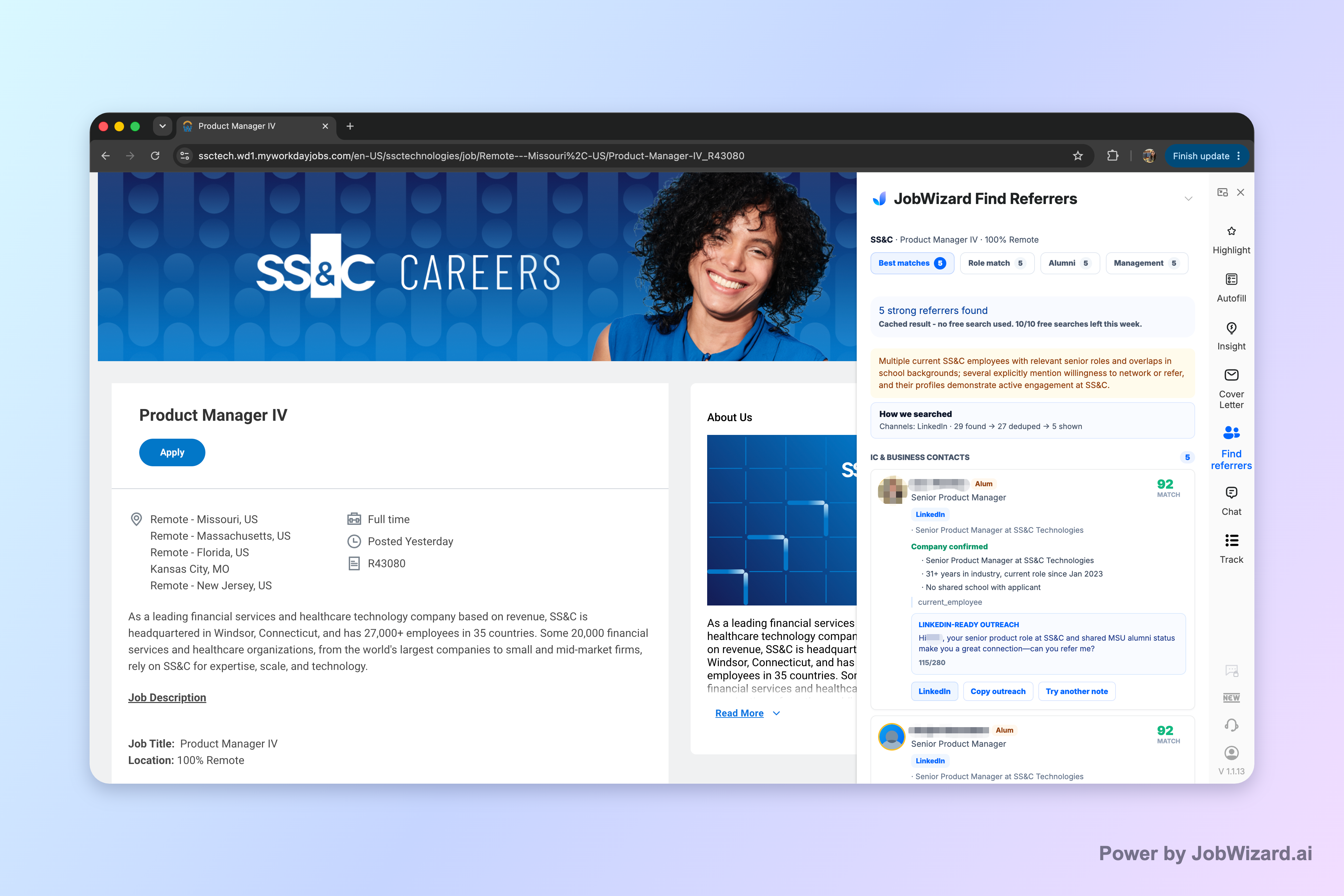
Specifically, Referral Finder organizes relevant employees by match type (including role and alumni context) and prepares an outreach draft the user can review and personalize. You still choose whom to contact, and you must add a truthful, specific reason for reaching out—so your networking message sounds like you, not like a template.
What “Best Chrome Extension for LinkedIn Easy Apply” should do (and what it shouldn’t)
When you search for the Best Chrome Extension for LinkedIn Easy Apply, it’s easy to get pulled toward features that promise “easy” in the wrong way. For job seekers, the best extension usually checks three boxes:
- Speed on repetitive fields — you shouldn’t waste time retyping the same basics every application.
- Review-before-submit — you need to confirm anything that’s role-specific, policy-related, or custom to the employer’s form.
- Support for real differentiation — if you’re applying at scale, you also need ways to stand out (like smart networking outreach).
JobWizard follows that “fast, but you stay in charge” model. It autofills repetitive fields so you can move quickly, while you review and submit applications yourself.
It also avoids unrealistic claims. For example, Referral Finder prepares outreach you can personalize, but it doesn’t guarantee you’ll receive a referral or that every contact suggestion will lead to a response. And it’s on you to add a truthful, specific reason when you reach out.
Why JobWizard stands out: autofill that’s meant for Easy Apply—and networking that’s actually useful
If your goal is to apply efficiently on LinkedIn jobs that route through common ATS platforms, your extension needs to be designed for real application forms—not just generic web scraping.
JobWizard’s workflow is built around two practical outcomes:
- Autofill + review-before-submit so you spend time on the parts that need your judgment.
- Referral Finder so you can pair “apply fast” with “reach out smart.”
JobWizard is used to drive 720,000+ applications and runs 600,000+ autofill sessions. Across those applications, JobWizard autofills an average of ~18 repetitive fields per application (typically 11–23).
That matters because Easy Apply funnels often repeat the same sections: identity, work authorization, education basics, and contact information. The faster you get through those, the sooner you can focus on what actually changes from job to job.
How the autofill workflow fits LinkedIn Easy Apply
Think of your Easy Apply session in three phases:
- Setup phase — your details, consistently captured.
- Repetitive fields phase — you’re filling the same kinds of form inputs across applications.
- Decision phase — you review sponsorship/salary/EEO/custom questions and any job-specific prompts.
JobWizard’s design maps to that second and third phases. It fills repetitive fields fast (average ~18 per application, typically 11–23). Then you review before you submit, which helps you avoid the most common Easy Apply failure mode: sending an application with a wrong answer to a question you didn’t notice.
Where JobWizard tends to save the most time
LinkedIn job posts may route to different systems behind the scenes. JobWizard usage data shows a spread across major ATS platforms:
- ~65% on Workday
- ~19% on Greenhouse
- ~12% on Ashby
- ~4% on Lever
Workday is where it tends to save the most time. So if your LinkedIn searches frequently land you in Workday-based workflows, JobWizard’s value is especially clear.
Referral Finder: the missing piece when you apply to many Easy Apply roles
Autofill can help you move quickly—but applying quickly isn’t the same as applying effectively. If you apply to multiple roles, your “edge” often comes from your ability to personalize outreach and establish a real connection.
That’s where JobWizard’s Referral Finder comes in.
What Referral Finder does (in plain English)
Referral Finder:
- Organizes relevant employees by match type
- Includes context such as role and alumni context
- Prepares an outreach draft you can review and personalize
And critically, it includes limitations you should understand up front:
- Don’t assume referral outcomes are guaranteed.
- You choose whom to contact.
- You must add a truthful, specific reason for reaching out.
In other words: Referral Finder helps you find good targets and creates a draft for you to tailor, but it doesn’t replace your judgment or your authenticity.
A concrete workflow example for LinkedIn Easy Apply
Here’s a realistic “apply + reach out” workflow you can use when you spot an Easy Apply role:
- Start the Easy Apply session and let autofill handle the repetitive fields.
- Before submitting, keep an eye on role-specific questions, custom prompts, and any policy-related answers so you can confirm they match your situation.
- Open Referral Finder for that same company/role context.
- Review matched employees by match type—look for people who genuinely align with the role or a believable connection.
- Use the outreach draft as a starting point, then personalize it with:
- Why you’re reaching out (truthful and specific)
- What you’re applying for
- One relevant detail (project, skill, or experience that matches the job)
- Only then contact people you selected—and send the message you’ve verified.
This approach pairs speed (autofill for Easy Apply) with differentiation (personal networking) without pretending that the extension can “make referrals happen” for you.
How to choose the best Chrome extension for Easy Apply (comparison checklist)
Even if JobWizard is the best match for your needs, you should still make sure it’s the right fit for how you apply. Here’s a simple checklist you can use while evaluating any Chrome extension marketed for Easy Apply.
| What to look for | Why it matters for LinkedIn Easy Apply | How JobWizard is positioned |
|---|---|---|
| Autofill focused on repetitive fields | You get through application screens faster without losing accuracy | Autofills an average of ~18 repetitive fields per application (typically 11–23) |
| Review-before-submit model | Prevents accidental “wrong answers” on custom or compliance questions | User reviews and submits applications themselves; repetitive fields are filled fast while items like sponsorship/salary/EEO/custom questions are left for review |
| Networking support | High-volume applicants need differentiation beyond quick clicks | Referral Finder organizes relevant employees and prepares an outreach draft for review and personalization |
| Clear limitations | Helps you avoid unrealistic expectations | Referral Finder does not claim guaranteed referrals; user chooses whom to contact and provides a truthful, specific reason |
| Coverage across common ATS routes | Easy Apply often sends you through different job portals | Usage shows broad use across Workday (~65%), Greenhouse (~19%), Ashby (~12%), and Lever (~4%); Workday tends to save the most time |
If a tool can’t (or won’t) align with a review-before-submit workflow, it’s harder to trust that your applications reflect your real answers. And if it can’t support networking or personalization, you may feel “faster” while still struggling to stand out.
Who JobWizard is especially good for
JobWizard is a strong fit if you:
- Apply to many roles and want to reduce repetitive data entry during Easy Apply
- Prefer a “speed up forms, then review carefully” approach
- Want help preparing outreach drafts to improve your chances beyond the application button
Who should be extra cautious
Even with the best Best Chrome Extension for LinkedIn Easy Apply, your success depends on what you submit and how you personalize outreach. Be especially cautious if:
- You’re not sure how to answer custom or compliance questions
- You plan to send outreach without a truthful, specific reason
- You’re applying with information that isn’t current
Do this automatically with JobWizard
Skip the manual work — JobWizard's Referral Finder handles this for you.
FAQ: Best Chrome Extension for LinkedIn Easy Apply
Is JobWizard a true Easy Apply automation that submits applications for me?
JobWizard is designed to autofill repetitive fields so you can move faster, but you still review and submit applications yourself. For any sponsorship, salary, EEO, or custom questions, you’ll review what’s filled in before you hit submit.
What does Referral Finder do for LinkedIn Easy Apply roles?
Referral Finder organizes relevant employees by match type (including role and alumni context) and prepares an outreach draft you can review and personalize. It doesn’t guarantee a referral, and it’s up to you to choose whom to contact and include a truthful, specific reason for reaching out.
Can I rely on Referral Finder to find accurate contacts every time?
Referral Finder helps you identify people to consider and generates an outreach draft for your review, but you should not treat it as a guaranteed source of contact accuracy or referral outcomes. You’re responsible for verifying details and writing a truthful, specific reason for outreach.
How many application fields does JobWizard typically autofill?
JobWizard autofills an average of ~18 repetitive fields per application (typically 11–23). It focuses on speeding up repeated form inputs, while leaving sponsorship/salary/EEO/custom questions for your review before submitting.
Does JobWizard work across the main applicant tracking systems on LinkedIn job posts?
JobWizard’s autofill is used across multiple ATS platforms: ~65% of submitted applications are on Workday, ~19% Greenhouse, ~12% Ashby, and ~4% Lever. Workday is where it tends to save the most time.
Final take: pick the Best Chrome Extension for LinkedIn Easy Apply that keeps you in control
The Best Chrome Extension for LinkedIn Easy Apply isn’t the one that “does everything for you.” It’s the one that helps you get through repetitive screens quickly, keeps you reviewing the parts that matter, and supports the real work of standing out.
With JobWizard, you get an autofill workflow built for review-before-submit—so you can move faster while staying responsible for your answers. And with Referral Finder, you can move beyond mass applying by preparing a reviewable outreach draft targeted to relevant employees.
Ready to apply smarter? Try JobWizard to speed up repetitive Easy Apply form fields and use Referral Finder to personalize outreach drafts before you contact anyone.
Frequently Asked Questions
Find someone to refer you — automatically
JobWizard spots employees at your target companies who can refer you, right from the job page.