Best Bulk Job Application Tool for Recruiters: A Smarter Way to Handle Volume
Looking for the best bulk job application tool for recruiters? Learn what application autofill can and cannot do, how to compare tools, and how job seekers can keep control of each submission.

Free Chrome extension
Autofill your next job application
JobWizard is a free Chrome extension that fills applications, tracks statuses, and optimizes your resume.
What “bulk job applications” means for recruiters and job seekers
The best bulk job application tool for recruiters depends on whether you mean managing candidates or helping applicants complete forms. Recruiters typically need systems for handling incoming applications, while job seekers use autofill tools to reduce repeated data entry across employer application pages.
That distinction matters when you compare tools: a recruiter-focused applicant tracking system and a job seeker’s application filler solve different problems. For this guide, the focus is the applicant-side workflow—using saved information to fill repeated fields while keeping every application available for review.
In practice, “bulk” should not mean sending the same unchecked answers to every employer. Contact details and work history may repeat, but eligibility questions, compensation expectations, and role-specific prompts deserve attention for each position.
How to choose the best bulk job application tool for recruiters
Choose a tool that reduces repetitive entry without removing your ability to check each application. The best bulk job application tool for recruiters, when used by job seekers to apply at volume, should make its scope clear and keep the final decision with the applicant.
- Supported pages: Check whether the tool works on the application pages you encounter; do not assume universal website coverage.
- Data source: Understand whether it uses saved profile and resume information to populate detected fields.
- Review workflow: Make sure you can inspect answers before submitting instead of relying on unreviewed submissions.
- Missing-field handling: Look for a way to identify questions that still need your response.
- Role-specific answers: Keep custom prompts and other context-dependent responses under your control.
Also separate convenience from accuracy. Autofill can reduce repeated typing, but it does not guarantee that every field is detected or that saved information fits a new role without edits.
How JobWizard Autofill handles repetitive application fields
JobWizard uses saved profile and resume data to fill detected fields on supported application pages, then leaves review and submission to you. Its Chrome extension is designed to help with repetitive form entry, rather than automatically submitting applications.
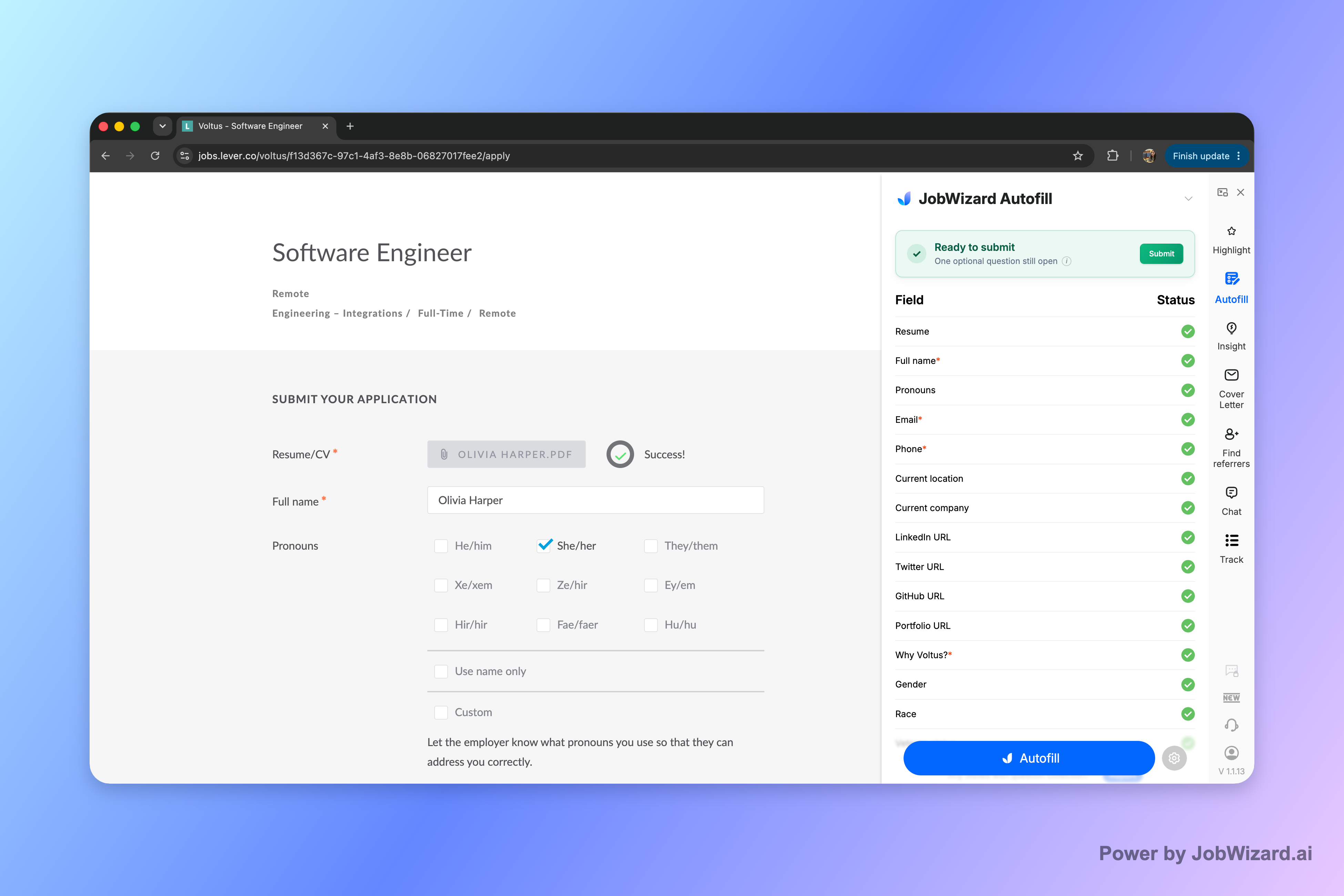
When a required field still needs attention, JobWizard can identify it and let you jump to the matching question. You can then check the populated information, answer anything missing, and submit the application yourself.
This workflow is useful when similar details recur across applications, but it is not a promise that every field will be filled or that every employer site is supported. Treat each completed form as a draft to inspect, especially when an answer depends on a particular job.
JobWizard is built for autofill plus review-before-submit: repetitive fields are filled, while the applicant checks the answers and submits.
How to use application autofill responsibly at volume
Use autofill to cut repeated typing, then make a separate review pass for every role. A consistent routine helps you move efficiently without overlooking fields that need a tailored answer.
- Prepare your source information: Keep your profile and resume details current before using them to fill application forms.
- Fill detected fields: Use autofill on a supported application page and let it populate the information it recognizes.
- Resolve missing questions: Check any fields that still require attention and respond directly to the relevant prompt.
- Review for fit: Confirm the details are accurate for this employer and role, including any custom responses.
- Submit yourself: Send the application only after you have checked the completed form.
This approach makes a meaningful distinction between speeding up form entry and applying without oversight. It also gives you a chance to catch stale details or answers that should change from one opportunity to another.
Do this automatically with JobWizard
Skip the manual work — JobWizard's Smart Autofill handles this for you.
Frequently asked questions
The right tool and workflow depend on what you want to automate and what you still need to review. These answers clarify how application autofill fits into a high-volume job search.
What is the best bulk job application tool for recruiters?
The best bulk job application tool for recruiters depends on the task. For a job seeker applying to multiple roles, choose a tool that autofills repetitive form fields but leaves each application available for review. JobWizard uses saved profile and resume data to fill detected fields on supported application pages; you review the answers and submit yourself.
Does JobWizard automatically submit bulk job applications?
No. JobWizard fills detected fields on supported application pages, but you review the populated answers and submit each application yourself. This helps keep role-specific responses under your control.
Can one job application autofill tool work on every employer website?
No tool should be assumed to work on every employer website or every field. JobWizard supports detected fields on supported application pages, and a required field may still need your attention.
How should I use autofill when applying to several jobs?
Use saved profile and resume data to fill detected fields, then review each application for accuracy and role-specific answers before submitting. If a required field needs attention, JobWizard can identify it and let you jump to the matching question.
Try JobWizard Autofill on your next application, review every answer, and submit only when the form is ready.
Frequently Asked Questions
Autofill your next job application
JobWizard is a free Chrome extension that fills applications, tracks statuses, and optimizes your resume.