What AI-Powered Job Search Tools Does Indeed Offer? A Clear Look at Its Features
What AI-powered job search tools does Indeed offer? Here’s how Indeed’s AI-assisted features can support a search—and where an application autofill tool fits into your process.
Free Chrome extension
Autofill your next job application
JobWizard is a free Chrome extension that fills applications, tracks statuses, and optimizes your resume.
What AI-powered job search tools does Indeed offer?
Indeed’s AI-assisted job search experience may help with parts of finding and evaluating opportunities, but you should verify its current features directly. Job boards regularly update their products, and the tools available can vary by account, location, or the specific workflow you are using. The phrase what AI-powered job search tools does Indeed offer? is best answered by separating discovery features from application-completion tools.
Before relying on any feature, check what it actually does: does it surface or organize jobs, suggest content, help answer questions, or fill an external employer form? Those are different steps, with different levels of user control. Treat a feature’s instructions and the live interface as the authority for its present behavior.
- Job discovery: Tools may help you explore openings or make sense of job information. Confirm whether a suggestion is based on your profile, search settings, or another signal.
- Application support: Assistance with an application may involve drafting, answering, or filling fields, but that does not automatically mean the application is submitted.
- Your decision: You remain responsible for deciding whether a job fits and whether each application answer is accurate.
That distinction matters when you are comparing an AI-powered job search feature with an application autofill tool. A job board can help you find a role; a separate tool may help populate fields on an employer’s application page. Neither should replace your review of the position or your answers.
How to evaluate Indeed’s AI job search features
Evaluate each feature by the task it performs, the information it uses, and the decisions it leaves to you. A broad label such as “AI-powered” does not tell you whether a tool recommends jobs, generates text, or interacts with an application. Look for a clear explanation of what is automated and what requires your approval.
Use this quick checklist when reviewing any feature:
- Identify the input: Does the feature use your profile, resume, search preferences, or text you provide?
- Identify the output: Does it recommend a role, summarize details, suggest wording, or populate form fields?
- Check the control: Can you review, edit, or reject its suggestions before they affect your application?
- Confirm the boundary: Does the feature stop at assistance, or does it take an action that needs your explicit approval?
- Verify the result: Check the live job listing and application form rather than assuming a generated summary includes every important detail.
For example, imagine a search tool recommends a customer support opening because its title resembles roles in your profile. That recommendation is a starting point, not proof that the schedule, location, pay range, or required experience matches what you want. Open the listing and compare its actual requirements with your priorities.
Likewise, if a tool suggests application wording, make sure it reflects your experience and answers the employer’s exact question. A polished sentence can still be inaccurate or too general. Keep ownership of the facts in your resume and application, and change suggested text that does not sound like you.
Where Indeed’s tools end and application autofill begins
Finding a job and completing its application are separate tasks, so the right tool depends on where you need help. A job search platform supports the process of locating and considering openings. An autofill tool, by contrast, is intended to help with repeated fields on supported application pages.
JobWizard’s Smart Autofill is a Chrome extension that uses saved profile and resume data to fill detected fields on supported application pages. You review the populated fields and submit the application yourself; the tool does not automatically submit it. If a required field still needs attention, JobWizard can identify it and let you jump to the matching question.
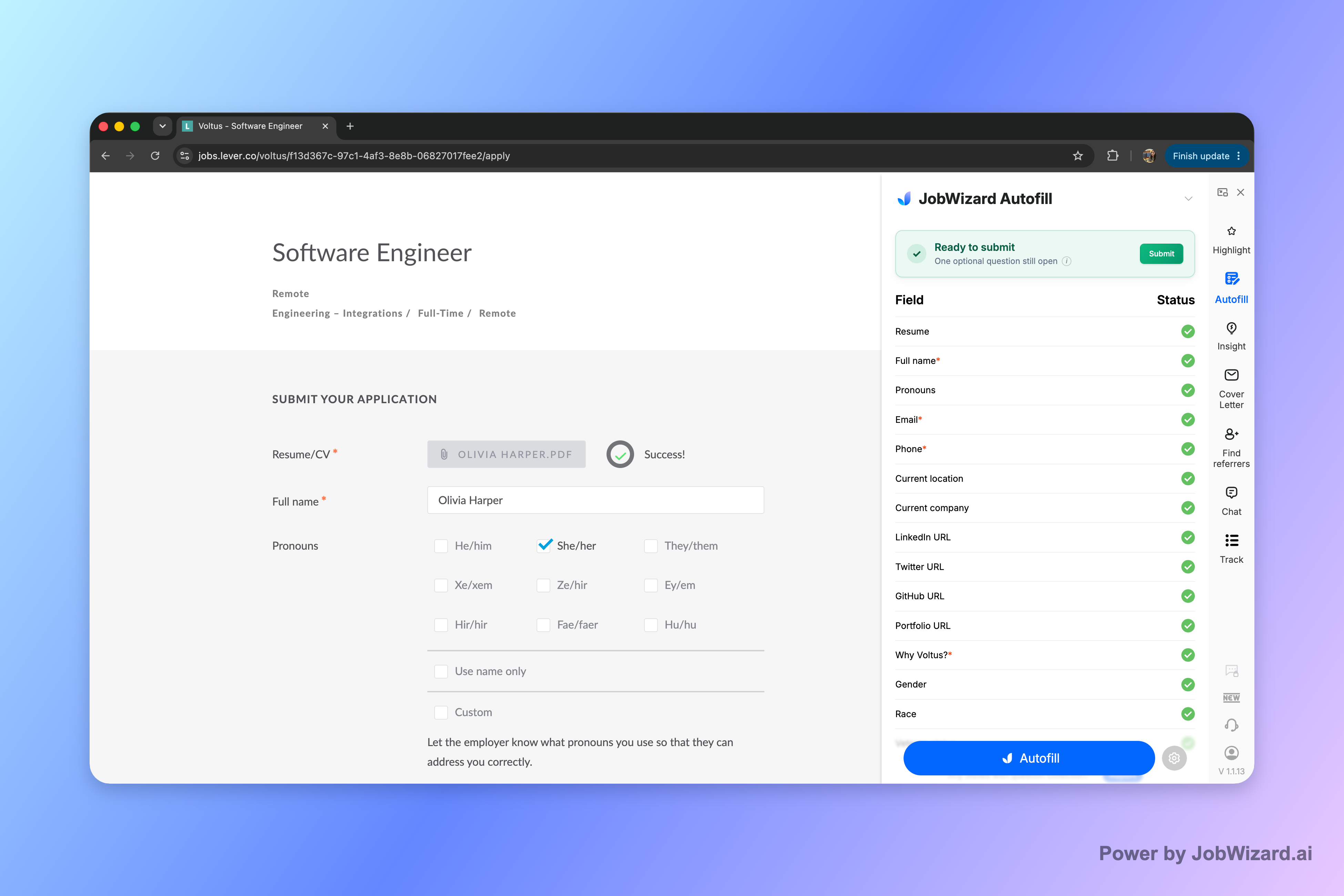
That workflow is useful when you have reached an employer’s form and want assistance with repeated information without handing over the final decision. It is not a guarantee that every field will be detected or filled, and it does not mean every application site is supported. Expect to check the form and provide any missing information yourself.
Consider a job you found on Indeed that sends you to an employer-hosted application. The job board helped you discover the opportunity; when you reach a supported application page, autofill may populate detected fields using your saved information. You then verify those details, answer any role-specific questions, and submit the form yourself.
Use the right tool at the right stage:
- Before applying: Assess the listing, employer, responsibilities, and requirements.
- While filling out the form: Use autofill only where supported, then inspect every populated field.
- Before submitting: Answer custom questions in your own words and correct missing or outdated information.
How to use AI assistance without losing control
Let AI reduce repetitive work, but personally verify answers that affect your eligibility or employment terms. Saved profile information can be convenient, yet an old resume or a broad answer may not fit the specific question on a new application. Review fields in context rather than treating populated forms as complete.
Some questions require a decision that cannot safely be inferred from a resume. Work authorization and sponsorship questions depend on your circumstances and the employer’s wording. Salary expectations, availability, and custom screening questions also deserve a deliberate answer—not a guess based on another application.
A practical review can be short and systematic:
- Match the question: Read the employer’s wording, not just the field label.
- Check the saved detail: Confirm that names, dates, contact information, and work history are current.
- Handle judgment calls yourself: Review sponsorship, salary, availability, and custom questions carefully.
- Look for gaps: If a required field is blank, answer it directly instead of assuming it was optional.
- Submit only after review: Confirm that the application represents you accurately before you send it.
For instance, a form might ask whether you will require sponsorship now or in the future. A tool should not decide what your answer means; you need to read the full question and respond truthfully based on your own situation. The same caution applies when an employer asks for a salary figure or a specific explanation of your experience.
Speed is useful only when accuracy stays intact. If a tool’s suggestion does not fit the role or your circumstances, edit it or leave it out. Keeping review and submission in your hands helps ensure that the application is both relevant and accurate.
Which approach fits your job search?
Choose based on the bottleneck you want to solve, not the fact that a tool uses AI. If you need help finding or assessing roles, explore the current search and recommendation features available in your Indeed experience. If you are already completing repeated application forms, look for an autofill workflow that explains its supported pages and leaves you in control.
| Your need | What to look for | What you should still do |
|---|---|---|
| Finding relevant openings | Search and discovery features with clear listing details | Read the original listing and check whether the role fits your criteria |
| Understanding a job description | Helpful summaries or explanations, if currently available | Verify responsibilities and qualifications against the full posting |
| Completing repeated form fields | An autofill tool that identifies fields on supported application pages | Review populated information and answer missing or custom fields |
| Answering a sensitive screening question | A clear opportunity to enter and review your own answer | Decide what is accurate for your situation before submitting |
There is no need to choose only one tool for every stage. You can use Indeed to search for opportunities and a separate autofill tool for supported employer forms, while reviewing the listing and application yourself. Check each product’s current instructions because features and availability can change.
The most reliable process keeps a person responsible for the decisions that matter: selecting a role, confirming claims, answering sensitive questions, and making the final submission. AI assistance can be useful without turning your job search into an unattended process.
Do this automatically with JobWizard
Skip the manual work — JobWizard's Smart Autofill handles this for you.
Frequently asked questions about Indeed AI job search tools
What AI-powered job search tools does Indeed offer?
The exact AI features available can change over time and may vary by account or experience. Check Indeed’s current product pages and settings for its latest tools; distinguish AI-assisted discovery or recommendations from tools that help complete an application.
Does Indeed automatically submit job applications with AI?
Do not assume that an AI feature submits an application for you. Read the instructions for the specific feature and review the employer’s application before submitting.
Can I use JobWizard with jobs I find on Indeed?
JobWizard’s Chrome extension uses saved profile and resume data to fill detected fields on supported application pages. You review the populated answers and submit the application yourself; support is not universal.
How should I review an AI-assisted application?
Check every populated field, especially questions about work authorization, sponsorship, salary, and other details that require your judgment. Correct anything incomplete or inaccurate before you submit.
Ready to handle repeated fields more efficiently? Try JobWizard Autofill on your next supported application, review every answer, and submit it yourself only when the details are accurate.
Frequently Asked Questions
Autofill your next job application
JobWizard is a free Chrome extension that fills applications, tracks statuses, and optimizes your resume.