LinkedIn Bio That Gets Replies: A Bio Framework + Outreach Drafts
A strong linkedin bio does more than describe your background—it signals what roles you want and makes it easy for people to reach out. Here’s a step-by-step framework.

Free Chrome extension
Find someone to refer you — automatically
JobWizard spots employees at your target companies who can refer you, right from the job page.
If you’re trying to land interviews, a linkedin bio can be the difference between “nice profile” and real conversations. The catch: most bios are either too generic (“passionate, hardworking, results-driven”) or too vague (“seeking opportunities”). The goal of your linkedin bio is simpler and stronger—make your target role instantly obvious and give people an easy, honest reason to reach out.
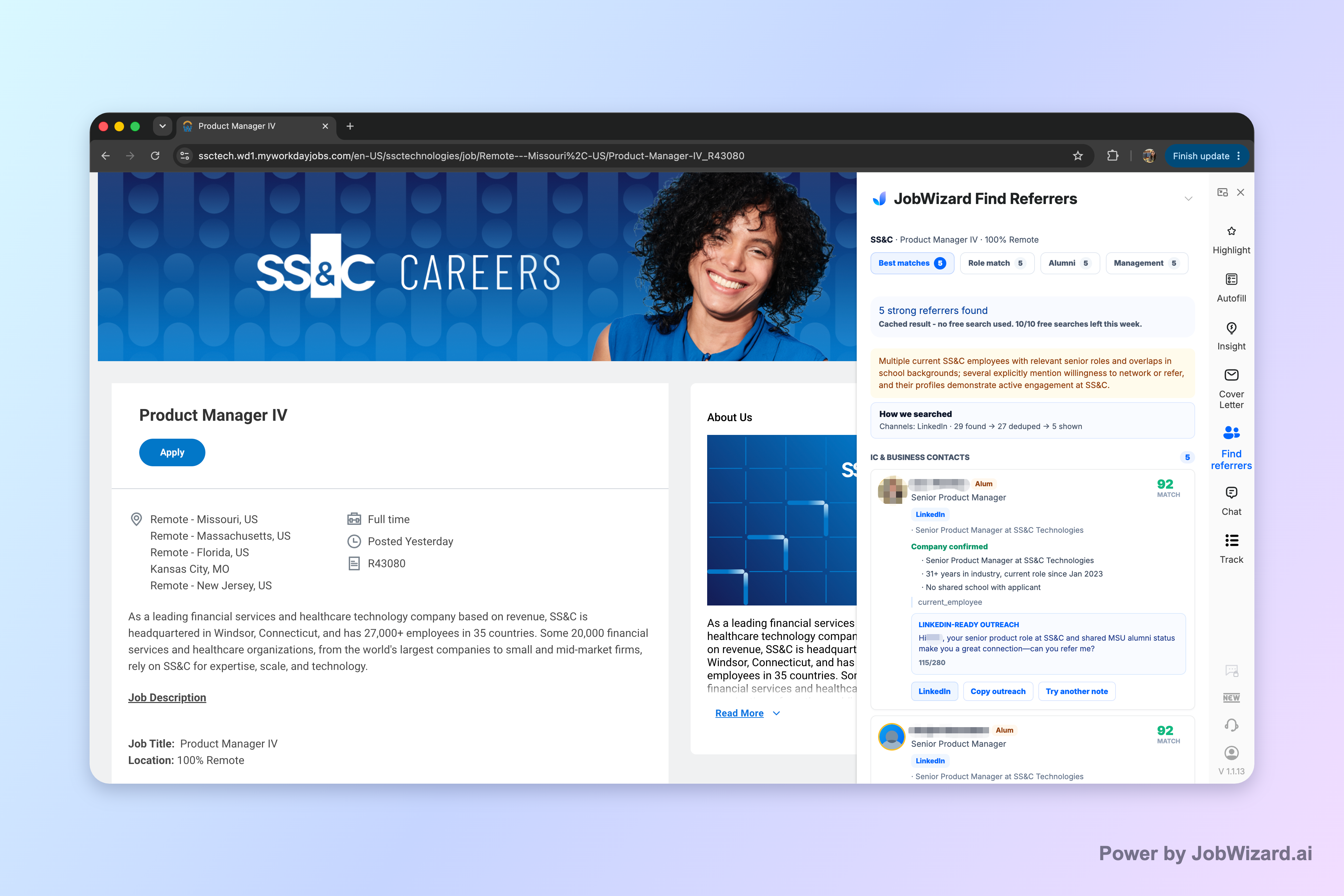
Once your bio makes the “what” clear, you still need the “who” and the “how.” Tools like JobWizard’s Referral Finder help you identify relevant employees and prepare an outreach draft you can review and personalize before contacting anyone. It organizes matched employees by match type and includes role and alumni context—so your outreach isn’t a cold message you hope someone ignores (or replies to).
What a strong linkedin bio must do (and what it shouldn’t)
A high-performing linkedin bio behaves like a mini landing page. When someone visits your profile, they should be able to answer three questions in under 10 seconds:
- What role do I want? (Be specific enough to attract the right recruiter—broad enough to stay flexible.)
- Why me? (Show proof through scope, tools, outcomes, or domain expertise.)
- What should we talk about? (Clarify the conversation—referral request, hiring question, informational chat.)
What to avoid in your linkedin bio:
- Filler adjectives with no evidence (“detail-oriented”, “team player”)—they don’t tell anyone how you work or what impact you’ve had.
- Career history dumps—your Experience section already holds the timeline. Your bio should summarize fit, not repeat it.
- Buzzword stacking—if everything is “AI-driven, data-first, end-to-end,” nothing is credible.
- Claims you can’t back up—including anything that might be inaccurate or exaggerated.
Rule of thumb: Your linkedin bio should read like a confident, specific message you’d actually send—because in practice, it becomes the first message people “see” before you ever reach out.
The linkedin bio formula that consistently clarifies your target role
Use this structure to write a linkedin bio that’s easy to scan and hard to misinterpret. It’s designed for US job seekers applying to roles where recruiters and networking contacts need to quickly understand fit.
1) Opening line: role + value + credibility hook
Your first line should combine three elements:
- Target role (e.g., “Data Analyst”, “Product Manager”, “Customer Success Manager”)
- Who/what you help (teams, domains, customers)
- Credibility hook (tools, scope, specialty, or type of results)
Examples (edit to match your reality):
- “Marketing analyst helping SaaS teams turn pipeline data into forecast-ready insights.”
- “Early-career software engineer focused on building reliable web apps and improving performance.”
- “Operations coordinator streamlining workflows across cross-functional teams in fast-moving environments.”
2) Proof bullets: 3–5 lines that show scope and impact
Follow with 3–5 bullets. Each bullet should answer: What did you do? and How big or measurable was it? If you don’t have exact metrics, use credible scope words (e.g., “migrated,” “supported X stakeholders,” “owned weekly reporting,” “reduced friction in onboarding”).
Bullet templates:
- “Built/owned ____ to support ____ (team size, workflow, or customer type).”
- “Improved ____ by ____ (quality, cycle time, reliability, adoption—whatever you can truthfully state).”
- “Led cross-functional ____ from ____ to ____.”
- “Created/maintained ____ using ____ (tools, frameworks, or methodologies).”
3) Skills “match phrases” (without turning your bio into a keyword list)
Include role-relevant keywords naturally—especially in your skills and proof bullets. A good test: if a recruiter reads your linkedin bio once and then tries to decide whether to click your resume, your “match phrases” should make that decision easy.
Example skills section concept: “Analytics: SQL, dashboards, experiment design. Collaboration: stakeholders, documentation. Tools: Excel/Looker (or what’s real for you).”
4) Call to action: who you want to talk to and why
Close your linkedin bio with a short invitation. Keep it honest and specific:
- “Open to referrals for ____ roles.”
- “Happy to connect with product leaders to learn about ____.”
- “If you’re hiring for ____ , I’d appreciate a conversation about how I can help.”
This matters because networking works best when your profile already contains a clear reason for someone to respond.
Make your linkedin bio work with outreach (not just “look good”)
Many job seekers treat their linkedin bio like decoration. But it’s actually your conversation starter. Your bio should reduce back-and-forth by letting outreach messages reference something concrete.
Write outreach that is consistent with your linkedin bio
Here’s a practical workflow you can follow:
- Update your bio first so it clearly states your target role and proof bullets.
- Create a short outreach draft that matches your bio’s language (same role title, same domain, same credibility hook).
- Personalize one detail per message: a project they own, a shared alumni context, or a role match type.
- Review before sending: remove anything that feels inflated or untrue.
- Send, then follow up appropriately based on your comfort level and the relationship context.
Use Referral Finder to reduce the “blank page” problem
JobWizard’s Referral Finder organizes relevant employees by match type and prepares an outreach draft you can review and personalize. The tool is built around helping you identify who to contact and giving you a draft that reflects the match type (including role and alumni context).
Important limitations to keep in mind:
- Do not assume referral accuracy or response success.
- No guaranteed referral is promised.
- You choose whom to contact and must add a truthful, specific reason for reaching out.
That’s exactly why your linkedin bio has to be specific: it gives you the credible “why you” and “why them” to write an outreach message that feels grounded rather than automated.
Linkedin bio examples for different job seekers (copy, then customize)
Use these examples as starting points. Replace every bracketed area with truthful details from your experience.
Example A: Career switcher (clear target + transferable proof)
Opening line: “Switching into data analytics to help teams turn messy data into decisions.”
- “Completed projects in SQL and dashboarding to analyze customer behavior and operational performance.”
- “Transformed requirements into repeatable reporting workflows for stakeholders.”
- “Collaborated cross-functionally to define metrics and validate assumptions.”
CTA: “Open to informational chats about data analyst roles in SaaS and operations.”
Example B: New grad (scope + learning + collaboration)
Opening line: “New grad software engineer building web apps with a focus on reliability and performance.”
- “Built features end-to-end, from requirements to testing and documentation.”
- “Improved app performance through profiling and iterative fixes.”
- “Worked with teammates to review PRs and maintain code quality standards.”
CTA: “Looking for entry-level roles where I can contribute quickly and learn from senior engineers.”
Example C: Experienced professional (domain + leadership proof)
Opening line: “Product operations leader improving execution and clarity across cross-functional teams in high-growth environments.”
- “Owned operational rhythms (planning, weekly metrics, and stakeholder updates) to keep teams aligned.”
- “Standardized processes and documentation to reduce handoff friction.”
- “Partnered with leadership to translate goals into measurable execution plans.”
CTA: “Interested in roles focused on operations excellence and scalable process design.”
Example D: Referral-focused outreach tone (profile-driven)
Opening line: “Marketing analyst focused on pipeline reporting and experimentation.”
- “Developed repeatable reporting dashboards for sales and marketing stakeholders.”
- “Supported campaign performance analysis using campaign attribution logic and KPI reviews.”
- “Built experiment tracking processes to improve decision speed.”
CTA: “If you work on marketing analytics or hiring for analyst roles, I’d appreciate a conversation—referrals welcome if there’s a fit.”
Common linkedin bio mistakes (and quick fixes)
Even talented candidates get overlooked when their bio makes scanning difficult or sends the wrong signal. Here are the most common issues—and what to do instead.
Mistake 1: Your target role isn’t stated until the bottom
Fix: Put the target role in your first line. If you want to stay flexible, choose a title range (e.g., “Data Analyst / BI Analyst”) rather than vague “seeking opportunities.”
Mistake 2: Proof bullets don’t describe scope
Fix: Add one scope descriptor to each bullet: “for X stakeholders,” “across Y teams,” “owned weekly,” “used in Z workflow,” or “delivered to customer segment.”
Mistake 3: You sound like everyone else
Fix: Replace at least two generic phrases with specific “how you work” details. Example: swap “results-driven” with “I build dashboards that turn stakeholder questions into weekly decisions.”
Mistake 4: CTA is missing or too passive
Fix: Add a real invitation: what you’re targeting and what kind of help you want. Networking responds to clarity.
Mistake 5: You treat your linkedin bio and outreach as separate tasks
Fix: Align the language between the two. If your bio says “forecast-ready insights,” your outreach should reference the same domain. Consistency makes you feel intentional.
Do this automatically with JobWizard
Skip the manual work — JobWizard's Referral Finder handles this for you.
FAQ about writing a linkedin bio that converts visitors into conversations
How long should my linkedin bio be?
Aim for clarity over length. Write 1–2 tight lines in your opening, then 3–5 bullets that prove fit (skills, results, scope). If you need more detail, use the Experience section for depth and keep the bio scannable.
What should I put in the first line of my linkedin bio?
State your target role and who you help, plus one credibility hook (domain or measurable specialty). For example: “Marketing analyst helping SaaS teams turn pipeline data into forecast-ready insights.”
Should I include keywords for hiring managers in my linkedin bio?
Yes—include role-relevant keywords naturally in the skills and proof bullets. Think of them as “match phrases” for recruiters and for the people you want to discover you through outreach or referrals.
How do I turn my linkedin bio into networking conversations?
End with a specific invitation: what you’re targeting and what kind of conversation you want (advice, referrals, or informational chats). Then use a personalized outreach message template and tailor it to the person’s role or shared context before contacting.
Can JobWizard help with outreach related to my linkedin bio?
JobWizard’s Referral Finder organizes relevant employees by match type and prepares an outreach draft you can review and personalize. You still choose who to contact and add a truthful, specific reason for reaching out—no guaranteed referrals are promised.
Ready to turn your linkedin bio into action? Start by writing an opening line + proof bullets + a clear CTA, then use JobWizard’s Referral Finder to identify relevant employees and generate an outreach draft you can review and personalize before reaching out.
Frequently Asked Questions
Find someone to refer you — automatically
JobWizard spots employees at your target companies who can refer you, right from the job page.