How to Answer Availability for Job Applications: Recruiter-Ready Scripts That Stay Flexible
Learn how to answer availability for job applications with clear, recruiter-ready scripts. Includes “Immediate,” “Two Weeks,” and a review-before-submit workflow.
Free Chrome extension
Let AI answer these questions for you
JobWizard fills sponsorship, work-auth, and availability answers correctly on every application — free.
How to answer availability for job applications so recruiters trust your timeline
When a job asks about availability, your goal in “how to answer availability for job” isn’t just honesty—it’s clarity that helps the recruiter plan next steps without guessing. If your answer is vague, overly firm, or changes midstream, you risk slowing down a process you’re trying to move forward.
In most applications, this question shows up as either a “start work” date, a “availability” dropdown, or a short text box. You can still be flexible—just make your flexibility easy to schedule. The easiest way is to (1) choose an availability anchor date, (2) include the earliest realistic start, and (3) offer a brief “what I can do if needed” line.
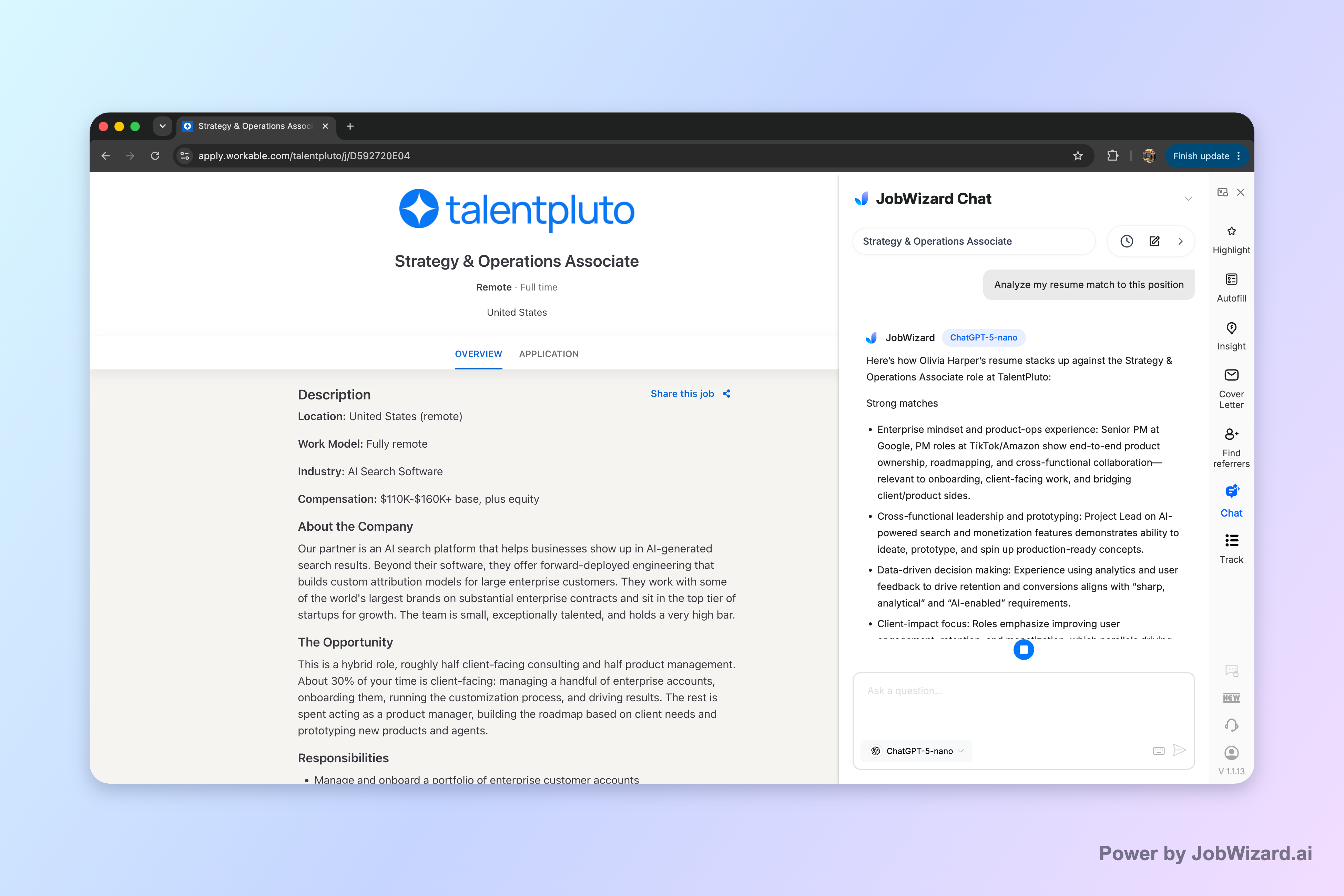
If you’re juggling multiple applications with different timelines, tools like JobWizard’s Career Chat can help you keep the current role in context while you refine what you’ll say next. Career Chat keeps the current role in context so you can ask follow-up questions about resume fit and application strategy without pasting the job description again.
Start with the availability facts: what recruiters are really asking
Recruiters usually aren’t looking for a perfect date—they’re checking whether you can start when they need you. Your availability answer helps them decide whether to advance you to interviews, coordinate onboarding, or plan an internal handoff.
Before you type anything, quickly identify which situation you’re in:
- Currently employed: you may need notice (common for “two weeks” or more).
- In between roles: you can often start sooner, but you may still need a few days for logistics.
- On a contract or scheduled commitment: you may have a fixed end date.
- Uncertain timing: you might be waiting on an approval, relocation date, or another offer.
Then map your truth to a recruiter-friendly form: a date, a range, or a “start window” that clearly states what they can expect. When you do that, you’re answering the question they actually care about: can they schedule you?
Use these availability scripts for job applications (and when to choose each)
The best “how to answer availability for job” answers all follow the same pattern: earliest start + flexibility boundary + optional next step. Below are ready-to-paste options you can adapt to your exact date.
1) If you can start immediately (but want a short ramp)
Use this when you’re ready to work soon, but you’re not literally starting the same hour. Keep it realistic: recruiters plan onboarding around days.
- Script A (earliest date anchor): “I’m available to start on [Day, Date]. I can begin onboarding as soon as the first scheduled start date.”
- Script B (flexible within the first week): “I can start as early as [Day, Date], and I’m flexible within that first week if onboarding needs a slight adjustment.”
- Script C (if the form only allows a short text): “Available starting [Day, Date] (flexible within the first week).”
If you need a couple of days to wrap up—logistics, travel, paperwork—don’t hide it. Just express it as schedule-ready flexibility.
2) If you need two weeks notice
This is the most common “delay” and the one recruiters expect. The key is to give an exact earliest start, not just “in two weeks.”
- Script A: “My earliest start date would be [Two weeks from today / Day, Date]. I can start immediately on that date.”
- Script B (offer optional partial availability): “I’m under notice and can start [Day, Date]. If helpful, I can discuss limited availability for handoff or overlap during the notice period.”
- Script C (if the form is picky): “Notice period: two weeks. Earliest start: [Day, Date].”
3) If you have a longer notice period
When notice is longer (three weeks, four weeks, end-of-month), be direct and add one helpful line about planning.
- Script A: “Due to my current commitment, my earliest start date is [Day, Date] (approximately [X weeks]).”
- Script B (planning-forward): “My start date is [Day, Date]. I can provide an overlap plan for knowledge transfer if you’d like.”
4) If you’re not sure yet (but you can estimate)
This situation is normal, but you need a commitment to confirm timing. Recruiters worry about “maybe” answers because scheduling depends on certainty.
- Script A (estimated window + confirmation timeline): “I’m estimating a start date in the week of [Week of]. I’ll confirm the exact date within [48 hours / 1 business day] of offer acceptance.”
- Script B (range): “My earliest realistic start date is [Day, Date], and I expect to finalize the exact date by [specific day].”
Note the difference: you’re not asking them to wait indefinitely—you’re giving them an evidence-based window and a clear follow-up deadline.
5) If the application asks for a “specific start date” and you must relocate
When location is tied to timing, include both the date and the readiness condition.
- Script A (relocation-ready): “I can start on [Day, Date], assuming final relocation logistics are complete by then.”
- Script B (remote-to-office path): “I’m available to start remotely on [Day, Date]. Office start would be [Office date] after relocation.”
6) If you see “immediate,” “two weeks,” and “flexible” options only (dropdown behavior)
If the form is limited, choose the option that matches your earliest start—not the one that sounds most favorable. Then clarify in the comment box if available.
- For dropdowns: pick the closest truthful option.
- For a comment box: add one sentence with the earliest date anchor.
If you’re also wrestling with the “meaning” of availability phrasing (especially in Workday-like workflows), this guide can help: “availability to work meaning” in job applications: what recruiters hear—and how to answer.
Turn your availability into a review-before-submit checklist (so you don’t contradict yourself)
Even a strong availability script can backfire if it conflicts with other parts of your application. Before you submit, do a consistency check across the places your timeline appears.
- Confirm the earliest start date: is it the same date (or same week) everywhere you entered it?
- Match your availability to your employment status: don’t claim “available immediately” while indicating you’re in notice elsewhere.
- Check your cover letter or notes: if you wrote a start window in text, ensure it agrees with the form selection.
- Watch for “estimated” language: if you said you’d confirm within 48 hours, don’t later imply it’s guaranteed.
- Make sure you’re not overpromising: “can start today” is different from “available within the first week.”
This is where a review-before-submit workflow matters. Autofill can quickly populate repetitive fields, but sponsorship and custom questions are still for you to review before you submit. That’s a good fit for availability answers because the timeline is personal and must match your reality.
If you’re specifically preparing for “start work” question variants, use these targeted scripts: How to Answer Availability to Start Work: Scripts for “Immediate,” “Two Weeks,” and More.
Common availability mistakes (and how to fix them fast)
Most availability problems come from formatting, not from intention. Here are the mistakes that most often cause recruiter confusion—and the fix for each.
Mistake 1: Saying “flexible” without any time boundary
Fix: Pair flexible language with an anchor date or a window.
- Instead of: “Flexible.”
- Use: “Flexible within a two-week window starting [date].”
Mistake 2: Choosing “immediate” when you mean “soon, but after notice”
Fix: Use your earliest truthful start date. If you truly need notice, pick the option that matches it or clarify in a comment.
Mistake 3: Over-explaining your situation
More detail isn’t always better—recruiters mainly need a timeline.
Fix: One sentence about the constraint is enough. Then move back to scheduling readiness (earliest start + flexibility window).
Mistake 4: Giving a date, then changing it later
Fix: If you’re uncertain, commit to a confirmation deadline instead of guessing. Example: “Estimated week of the 21st; I’ll confirm within 48 hours.”
Mistake 5: Not answering the exact question the application asks
Some forms ask about “availability,” others ask about “start work,” and others ask for a more specific phrase like “what is your availability?”
Fix: Use the exact framing the form expects. For a deeper walkthrough, see How to Answer "What Is Your Availability?" on a Job Application.
Do this automatically with JobWizard
Skip the manual work — JobWizard's Smart Autofill handles this for you.
Availability FAQ: scripts and quick answers recruiters understand
If you want the fastest way to finalize your answer, use these ready responses for the most common availability scenarios.
What should I say if I’m available immediately but want a few days to wrap up?
Say you can start “as soon as the first workable start date,” then name a specific earliest date. Example: “I can start as early as Monday, and I can be flexible within the first week if onboarding needs a later date.”
How do I answer availability if I need two weeks notice?
Be direct and offer a concrete timeline. Example: “My earliest start date would be two weeks from today. If you need me earlier for training or handoff, I can discuss options for partial availability.”
What if the job asks for an exact start date and I’m not sure yet?
Give a best estimate plus a verification window. Example: “I’m estimating a start date of the week of the 21st. I’ll confirm by email within 48 hours of offer acceptance.”
Should I ever write “flexible” for availability?
It’s okay when paired with a range or anchor date. Prefer: “Flexible within a two-week window starting from [date].” Avoid vague entries like “whenever” without any time boundary.
How do I answer availability if I’m already interviewing elsewhere?
Stay truthful and scheduling-focused. Example: “I’m actively in process interviews, but my earliest start date is [date]. If I’m selected, I’ll confirm availability by [day/time] so you can plan next steps.”
Ready to answer availability confidently across applications? Use JobWizard to autofill repetitive fields and then review-before-submit so your personal timeline stays accurate. If you want, you can also use Career Chat to ask a focused question about the current role and verify your answer aligns with what the posting emphasizes—without pasting the job description again.
Want more broader question-writing support too? Read How to Answer Job Application Questions: A Field-Tested Method for Confident, Consistent Responses to pair your availability timing with strong, consistent answers everywhere else.
Frequently Asked Questions
Let AI answer these questions for you
JobWizard fills sponsorship, work-auth, and availability answers correctly on every application — free.