
How Many Jobs Should I Apply For? A Practical Numbers Plan (and How to Decide)
Wondering how many jobs should i apply for? Use a realistic weekly target, quality checks, and JobWizard autofill + review-before-submit to apply smarter—not just faster.

Free Chrome extension
Autofill your next job application
JobWizard is a free Chrome extension that fills applications, tracks statuses, and optimizes your resume.
Most job seekers don’t struggle with trying—they struggle with deciding how many jobs should i apply for without turning their search into either a lottery or a full-time second job.
A good application strategy balances three things: (1) enough volume to stay in motion, (2) enough targeting to avoid wasting effort, and (3) enough review time that you submit thoughtfully. Below is a practical numbers plan you can use immediately, plus a workflow you can repeat weekly.
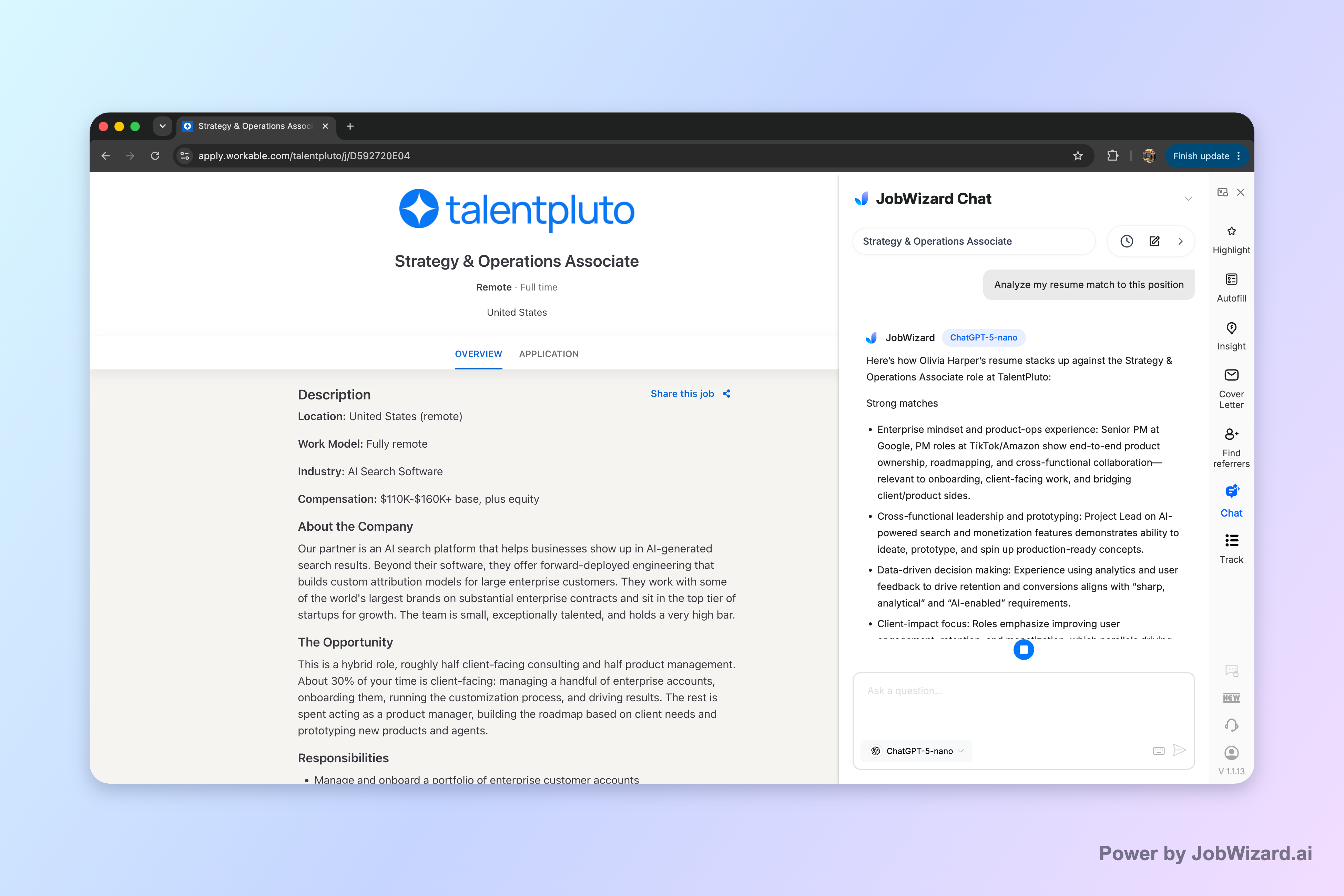
JobWizard includes Career Chat, which keeps the current role in context so you can ask follow-up questions about resume fit and your application strategy without pasting the job description again.
Start with a weekly target: how many jobs should i apply for?
The fastest way to answer “how many jobs should i apply for” is to pick a weekly range you can sustain while still tailoring your materials. A common starting point for US job seekers is 10–20 applications per week.
That range isn’t a “magic number.” It’s a working target that lets you test the market while you keep quality high. If you’re applying to roles where your resume already matches well, you can be closer to 20; if you’re adjusting your resume significantly for each posting, aim closer to 10.
Use this simple adjustment rule
Once you pick a baseline week, adjust based on how much work each application requires. Use this quick rubric:
- Closer to 10/week if each application needs major resume edits or you’re frequently changing your target role level (e.g., senior vs. mid-level).
- Closer to 20/week if you’re applying to roles that are truly similar and your updates are mostly small edits (headline focus, a few bullet swaps, and custom answers).
- Below 10/week if you’re early in your search and you still need to rebuild core resume messaging, tighten your portfolio, or refine your target list.
- Above 20/week only if you can keep submitting with the same quality bar (especially for custom questions and accuracy checks).
What the “right” number looks like in practice
Here are realistic examples for different situations:
- Example 1 (tailored resume work): You’re pivoting industries. You keep making big changes to translate your experience. Target 10/week and spend extra time aligning bullets to the posting’s responsibilities.
- Example 2 (strong match): You’re applying to the same job family (e.g., Strategy & Operations) with minor tweaks. Target 15–20/week and keep a consistent resume version that you lightly customize.
- Example 3 (tight constraints): You only apply to fully remote roles within one time zone and certain compensation bands. You may only find fewer openings—so use 10–15/week as a practical goal and widen search only if you’re not reaching enough volume.
Balance fit and volume: build an “apply set,” not a random pile
To decide how many jobs to apply for, focus on creating a high-fit apply set—then apply to enough of them each week to keep momentum. The key is: your fit checklist determines your usable volume.
If your applications are consistently low-fit, more quantity won’t fix the underlying mismatch. Instead, improve targeting so each week’s applications represent real opportunities.
Use a fit checklist before you apply
For each role, run a quick screen. You don’t need perfection—just a defensible match to what the employer is asking for:
- Responsibilities match: Do your past projects or results map to what they’re hiring for?
- Must-have skills: Do you have the core tools, domains, or experience level they require?
- Level alignment: Are you roughly the right seniority and scope?
- Constraints match: Location/remote, work authorization needs, and schedule requirements.
- Communication match: Do you have evidence you can write/communicate in the context they describe (e.g., stakeholder management, documentation, cross-functional execution)?
Pick a mix of “safer” and “stretch” roles
A strong strategy uses multiple buckets so your week includes some high-probability applications and some growth opportunities.
- Safer bucket: Roles where your resume already matches the must-haves and scope.
- Stretch bucket: Roles where you match most must-haves but may need to emphasize adjacent experience or rapid learning.
Then your “how many jobs should i apply for” number becomes easier: you’re not guessing quality—you’re applying based on categories you can repeat week after week.
How to scale without losing quality (a review-before-submit workflow)
Once you’ve picked your weekly target, the biggest risk is spending so much time filling forms that you either under-apply or rush. A better approach is to streamline repetitive steps while keeping control of the parts that require your judgment.
JobWizard supports this workflow by autofilling repetitive fields while you review everything before submitting—so you can maintain targeting instead of “spraying and praying.”
What to expect from autofill (and what you still own)
Across 720,000+ applications submitted and 600,000+ autofill sessions run through JobWizard, autofill typically fills about ~18 repetitive fields per application (typically 11–23). Importantly, the model is used as an assist—not a blind auto-submit mechanism.
About the application mix: ~65% of these applications are on Workday, ~19% Greenhouse, ~12% Ashby, and ~4% Lever (with Workday typically saving the most time). In all cases, the user reviews and submits.
A repeatable weekly workflow (so your number stays realistic)
Use this workflow to stay consistent at your chosen “how many jobs should i apply for” pace:
- Day 1: Build the apply set (10–30 roles saved). Apply your fit checklist to narrow to the best candidates for the week.
- Day 2: Customize only what matters (resume highlights + any role-specific alignment).
- Day 3–4: Submit with assist + review (autofill repetitive fields, then carefully review sponsorship/salary/EEO/custom questions).
- Day 5: Log outcomes + refine targeting (what got rejected, what got interviews, and what you should change).
What you should never “set and forget”
Even with autofill, you should manually verify items that can’t be guessed safely. Keep special attention on:
- Sponsorship/authorization details: Only submit what matches your real eligibility.
- Salary/compensation answers: Don’t let defaults override your strategy or your constraints.
- EEO and custom questions: These are often used to confirm eligibility or fit; answer accurately and consistently.
- Any free-response fields: Rewrite so the story matches the job’s responsibilities.
When to increase or decrease your application count
If you want to learn “How many jobs should i apply for” in a way that improves results, you need a feedback loop—not a fixed number. Use your recent outcomes to decide whether to ramp up or refine.
Your weekly target should change only when you learn something. Here’s a simple decision model you can run after 2–3 weeks.
Increase applications when…
- You’re getting rejections that look like fit mismatch but you have enough similar roles in your search (meaning you can improve targeting and keep volume).
- You’re getting interviews but not enough to convert—more submissions can increase opportunities while you keep quality.
- You’re running out of pipeline (few new openings, long gaps between applications). Add roles to your set, within your constraints.
Decrease applications when…
- Low response correlates with inconsistent customization (e.g., you started cutting corners or changing your resume too late).
- You’re applying to too-broad roles and your fit checklist fails repeatedly.
- You’re spending more time fighting form issues than improving materials—scale down and streamline your workflow first.
Use Career Chat for tighter follow-up questions
If you’re unsure whether your resume evidence matches a role, ask a focused follow-up question. Career Chat keeps the current role in context so you can verify what to emphasize (and what not to waste space on) without reposting the job description.
Important: Treat Career Chat as a tool to help you think, not as a recruiter decision or a guarantee that you qualify. You’re still responsible for making sure your answers and materials match the posting.
Do this automatically with JobWizard
Skip the manual work — JobWizard's Smart Autofill handles this for you.
FAQ: How many jobs should i apply for?
How many jobs should i apply for per week?
A practical starting point is 10–20 applications per week, adjusted for how tailored each application is. If your resume needs major rewriting for each role, stay closer to 10 and focus on stronger targeting; if you’re matching well and can keep edits lightweight, you can move toward 20.
Is applying to more jobs always better?
No. More volume helps only if the jobs are a reasonable fit and your materials are consistently strong. A better approach is to apply to enough roles to stay active, while using a fit checklist (skills alignment, level, location/remote, and must-have requirements) to avoid low-quality applications.
Should I apply to different job titles at the same time?
Yes—if they’re genuinely aligned with your experience and goals. For example, if you’ve done Strategy + Operations work, you might apply to “Strategy & Operations” and “Operations Strategy” roles at the same time, but you should ensure each posting’s must-haves still match your resume and you’re not stretching past your actual experience.
What should I do if I’m not hearing back after lots of applications?
When you’re not hearing back, treat it as a feedback signal to troubleshoot. Re-check job fit (are you meeting the posting’s must-haves?), tighten your resume bullets to mirror the role’s core responsibilities, and make sure custom questions and EEO/sponsorship items are answered accurately before you submit.
Can JobWizard help me decide how many jobs to apply for?
JobWizard can support your workflow by autofilling repetitive fields, then letting you review before submitting so you can keep your applications targeted. You can use that time to scale up to your weekly target without sacrificing the fit checks and the parts that require your judgment.
Ready to apply with a smarter weekly target?
If you’re asking “How many jobs should i apply for” because you want momentum without sacrificing fit, choose your weekly range (start with 10–20) and run the same quality checklist every time. Then use JobWizard to handle repetitive form fields—while you stay in control of the responses that require accuracy.
Try JobWizard to autofill repetitive application fields and keep your workflow focused on job fit and review-before-submit decisions.
Frequently Asked Questions
Autofill your next job application
JobWizard is a free Chrome extension that fills applications, tracks statuses, and optimizes your resume.