A Strong Certified Nursing Assistant (CNA) Job Application Form Template for Care Roles
Use this certified nursing assistant (cna) job application form template to prepare accurate work history, credentials, references, and answers before applying for a CNA role. Learn what to include and how to review an online application before submitting it.

Free Chrome extension
Autofill your next job application
JobWizard is a free Chrome extension that fills applications, tracks statuses, and optimizes your resume.
Start with a CNA application form you can complete accurately
A certified nursing assistant (cna) job application form template helps you organize the details employers commonly request before you begin an application. CNA openings can ask for credential information, care experience, availability, and references in addition to basic contact details. Preparing those answers first makes it easier to complete each employer’s official form carefully.
Use the template below as a preparation worksheet, not as a replacement for an employer’s application. Requirements vary by workplace and position, so follow the instructions on the official application and answer every question truthfully.
What to include in a certified nursing assistant (CNA) job application form template
A useful template covers your contact details, credentials, relevant experience, references, and practical availability. Gather information that you can verify, then customize it to match the role rather than copying the same generic answer into every application.
Copy this checklist into a document or notes app and fill in the sections before applying:
- Contact information: Full name, phone number, professional email address, and city and state. Include a mailing address if the employer asks for one.
- Position details: Job title, employer name, location, and the date you are applying. Note whether the job is full-time, part-time, per diem, or another arrangement if the posting specifies it.
- CNA credential details: State of certification or registry, credential number if requested, and current status. Use the exact information shown in your records.
- Training and education: CNA training program, school or provider, completion date, and other relevant healthcare education or training.
- Work history: Employer, role, location, dates, main responsibilities, and a brief reason for leaving if requested. Include relevant clinical placements or volunteer experience if appropriate, clearly labeled.
- Care experience: Relevant responsibilities such as assisting with daily living activities, observing and reporting changes, or supporting residents and patients. Describe only work you actually performed.
- References: Names and current contact details for people who have agreed to serve as references. State each person’s professional relationship to you.
- Availability: Days, shifts, weekends, start date, and scheduling constraints. Be specific and realistic about what you can work.
- Employer-specific questions: Space to draft responses about qualifications, work authorization, or other topics the employer asks about. Follow the form’s wording and instructions.
Keep sensitive details to the fields the employer requests. A worksheet can help you prepare, but you should not add private information simply because you have space for it.
How to turn the template into a polished application
Match your experience to the posting, then check every detail against your records. A clear, specific application helps an employer understand what you have done and what role you are seeking without overstating your qualifications.
- Read the posting: Note required credentials, duties, shift expectations, and any application instructions before drafting answers.
- Choose relevant examples: Select experience that connects to the role, such as providing personal care or communicating observations to the appropriate team member, if those duties reflect your actual background.
- Use concrete wording: Describe your responsibilities plainly. Avoid vague claims such as “did everything” or unsupported claims about outcomes.
- Check dates and names: Compare employment dates, credential details, and reference information with your records so the form is consistent.
- Tailor availability: State the shifts you can reliably work instead of implying open availability you do not have.
- Proofread the final form: Review spelling, contact details, and required answers before submitting through the employer’s process.
For example, instead of writing “helped patients,” describe the specific duties you performed and the setting where you performed them. Keep the wording accurate, concise, and relevant to the job description.
Complete online CNA applications with a careful review
Online application tools can help with repetitive fields, but you should review every populated answer and submit the application yourself. JobWizard’s Chrome extension uses saved profile and resume data to fill detected fields on supported application pages. If a required field still needs attention, JobWizard can identify it and let you jump to the matching question.
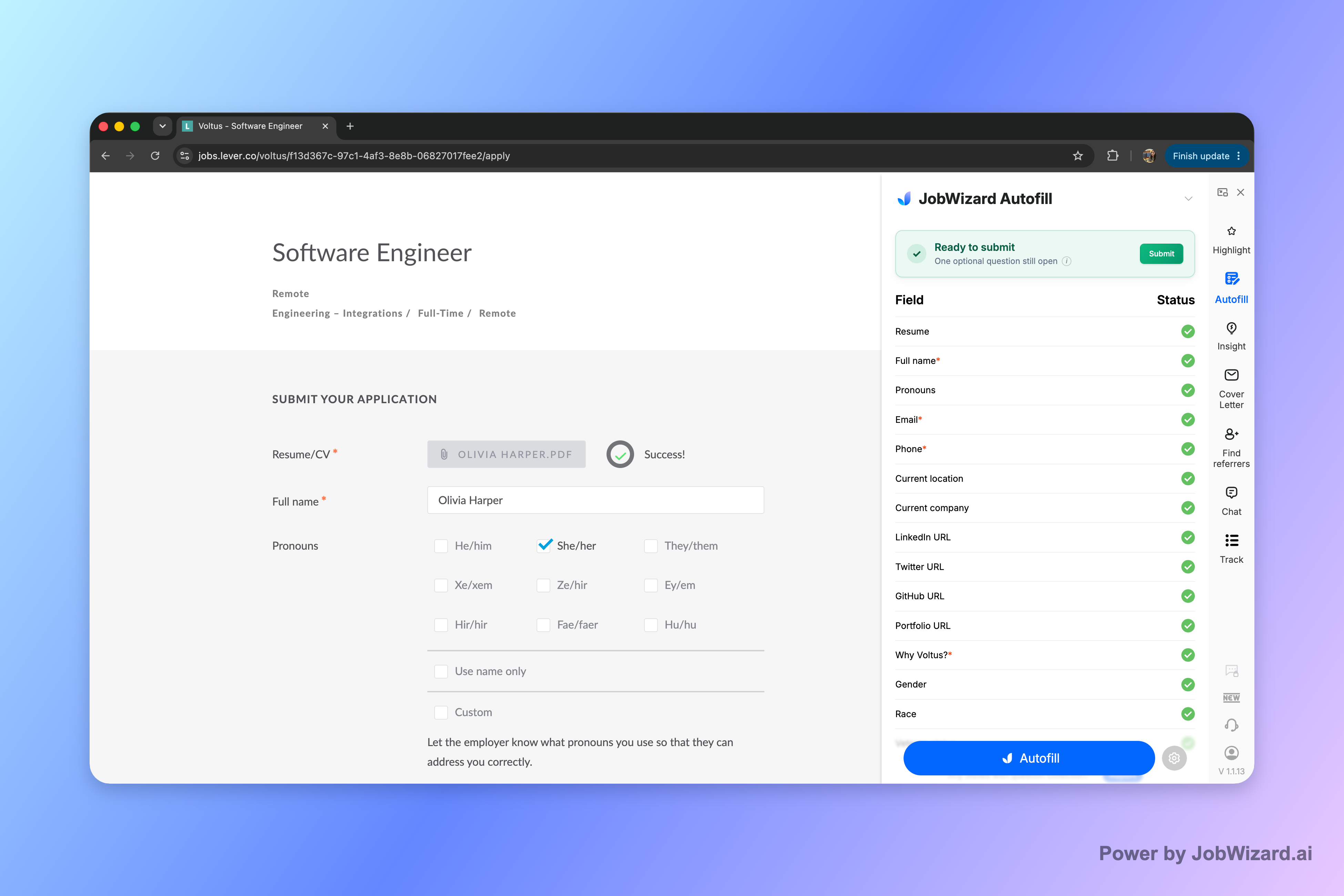
Autofill is a starting point, not a substitute for checking the employer’s form. Confirm that names, dates, credential details, work history, and availability are accurate; review any employer-specific questions directly; and submit only when the application is ready.
A simple review routine can help prevent avoidable errors:
- Verify each filled field: Check that the answer belongs in that field and is current.
- Review credentials closely: Confirm the state, status, and any requested number against your documentation.
- Read custom questions yourself: Make sure your response addresses the exact question and reflects your experience.
- Check required fields: Resolve anything the form still flags before moving forward.
- Submit deliberately: Use the employer’s submit control yourself after completing your review.
JobWizard is designed to fill detected fields on supported application pages; it does not guarantee that every field or website will be supported. Keep your prepared template available so you can answer questions that need a personal or employer-specific response.
Do this automatically with JobWizard
Skip the manual work — JobWizard's Smart Autofill handles this for you.
FAQ about a certified nursing assistant (CNA) job application form template
These answers cover common questions about preparing and completing CNA applications. Use the employer’s official instructions whenever they differ from general preparation advice.
What should a certified nursing assistant (CNA) job application form template include?
It should cover contact information, CNA credential details, relevant training, work history, references, availability, and employer questions. Use it to organize accurate information before completing the employer’s official application.
Can I use the same CNA job application template for every employer?
Use one master template to keep your information organized, then tailor your work history, availability, and supporting details to each position. Always answer employer-specific questions on the official application.
Should I include my CNA certification number on an application?
If the employer requests it, provide the credential information accurately and make sure it matches your state registry or certification records. Do not guess at a number or credential status.
Can JobWizard fill out a CNA job application form for me?
JobWizard’s Chrome extension uses saved profile and resume data to fill detected fields on supported application pages. You review the populated answers, address any required fields that need attention, and submit the application yourself.
Prepare your next CNA application with confidence
Use your template to organize the facts, then give every employer’s application a final, personal review. Keep your credentials and work history accurate, tailor relevant details to the position, and answer custom questions in your own words.
Try JobWizard Autofill on your next application to fill detected fields from your saved profile and resume data. Review every answer, complete any fields that still need attention, and submit only when you are satisfied with the application.
Frequently Asked Questions
Autofill your next job application
JobWizard is a free Chrome extension that fills applications, tracks statuses, and optimizes your resume.