ATS Resume Keywords for Software Engineer Roles: How to Match
Learn how to find and use ATS resume keywords for software engineer roles to boost match rates, avoid keyword stuffing, and get more interviews....
Free Chrome extension
See your resume's match score for any job
JobWizard compares your resume to each job description and shows the exact keywords to add — free.
ATS resume keywords for Software Engineer roles: match faster and get more interviews
If you’re applying for Software Engineer jobs, the right ATS resume keywords can be the difference between a resume that ranks and one that never gets seen. This guide shows you how to identify the exact terms recruiters scan for, translate your experience into keyword-ready language, and tune your resume for popular ATS platforms (like Greenhouse, Lever, and iCIMS) from a job seeker’s perspective. You’ll also learn practical ways to avoid keyword stuffing while still improving match score and application completion speed.
Along the way, you’ll see how JobWizard helps with smart autofill, resume optimization, and cover letter generation so your details land accurately in ATS forms. If you want a faster path to tailored applications, start with smart autofill for ATS forms and then refine your keyword alignment.
How ATS for Software Engineer roles actually uses keywords
Most ATS systems don’t “read” your resume like a human. Instead, they extract structured fields and index text for skills and qualifications that match the job description (JD). In practice, that means ATS resume keywords are usually pulled from: your headline/summary, skills section, project bullets, work experience descriptions, and sometimes certification or coursework.
For Software Engineer roles, the ATS commonly looks for a mix of technical skills, tools, deployment practices, and scope signals (scale, impact, performance, reliability). Some keywords are literal (e.g., “React,” “PostgreSQL”), while others are inferred from phrasing (e.g., “CI/CD pipelines” for “GitHub Actions” and “build/test/deploy”).
Tip: Don’t treat keywords as a checklist you sprinkle randomly. Treat them as a translation layer between the JD language and your real work—accurate, specific, and supported by evidence.
Build a keyword map from the job description (copy-ready process)
The fastest way to match ATS resume keywords is to create a “keyword map” for each target job. Do this for 5–10 roles you want, and you’ll start spotting patterns that you can reuse across applications.
Step 1: Pull the keyword categories the JD repeats
Open the job posting and scan for repeated language under headings like Requirements, Qualifications, Responsibilities, and “Nice to have.” Then capture keywords into categories like the examples below.
- Languages & frameworks: Java, Python, JavaScript/TypeScript, Go, .NET, React, Node.js
- Backend & data: REST APIs, GraphQL, SQL, PostgreSQL, MongoDB, Redis
- Cloud & infrastructure: AWS (S3, Lambda), GCP, Azure, Docker, Kubernetes
- DevOps & CI/CD: CI/CD, GitHub Actions, Jenkins, Terraform, Helm
- Testing & quality: unit/integration tests, Jest, PyTest, JUnit, TDD
- Performance & reliability: caching, observability, latency, SLOs, incident response
- Security & compliance: OAuth2, JWT, RBAC, OWASP, secrets management
- Collaboration & process: Agile/Scrum, code reviews, documentation
Step 2: Convert keywords into “evidence statements” from your resume
ATS prefers keywords that appear in context. Instead of only listing tools in a skills section, use evidence bullets in projects and work experience. For example:
- Instead of: “React, TypeScript, Redux” (only a list)
- Use: “Built a React + TypeScript dashboard with Redux state management; reduced page load time by 28% by optimizing component rendering and API response handling.”
- Instead of: “AWS, Docker, Kubernetes” (only a list)
- Use: “Containerized services with Docker and deployed to Kubernetes (Helm charts), cutting deployment time from 45 minutes to 12 minutes using automated CI/CD pipelines.”
Step 3: Match the JD’s wording level (don’t invent tools)
Keep keywords truthful. If the JD says “Kafka” and you built event streaming with a different system, don’t claim Kafka. Instead, match at the correct abstraction level:
- JD keyword: “event streaming (Kafka)”
- Your truth: “event-driven messaging with RabbitMQ”
- Keyword-aligned bullet: “Implemented event-driven workflows using RabbitMQ, including retry/backoff policies and idempotent consumers to improve reliability under load.”
This approach still helps ATS associate “event streaming” with your experience without misrepresenting the specific tool.
ATS resume keywords for common Software Engineer stacks (with examples)
Use the examples below to quickly tailor ATS resume keywords to the most common Software Engineer role patterns. The goal is not to include everything, but to select what matches the JD and can be defended with concrete results.
Frontend Engineer keywords (React, TypeScript, performance)
Look for JDs that mention user interface responsibilities, state management, and performance. Example keyword set:
- React, TypeScript, JavaScript
- REST/GraphQL clients
- Testing: Jest, React Testing Library
- Performance: bundle optimization, memoization, lazy loading
- Tooling: Webpack/Vite, ESLint, Prettier
- UX/accessibility: ARIA, WCAG, accessibility testing
Copy-ready bullet example:
“Developed a React + TypeScript feature that integrates with REST APIs; improved Lighthouse performance scores by 20% by enabling code-splitting, optimizing rendering via memoization, and adding client-side caching for frequently accessed data.”
Backend Engineer keywords (APIs, databases, scalability)
Backend JDs often emphasize APIs, data consistency, and reliability. Example keyword set:
- REST APIs, authentication/authorization (OAuth2, JWT)
- Databases: PostgreSQL/MySQL/MongoDB
- ORMs: SQLAlchemy, Hibernate, Prisma
- System design: scalability, reliability, rate limiting
- Observability: logging, metrics, tracing
Copy-ready bullet example:
“Designed and implemented REST APIs with JWT-based authentication; optimized PostgreSQL queries and indexing strategy to reduce p95 latency by 35% and improve throughput during peak traffic.”
Full-stack keywords (end-to-end delivery and integration)
Full-stack roles often expect you to connect frontend, backend, and deployment pipelines. Example keyword set:
- Frontend: React, TypeScript
- Backend: Node.js/Java/Python
- Data: SQL + caching (Redis)
- DevOps: CI/CD, Docker
- Testing: unit/integration + automated pipelines
Copy-ready bullet example:
“Delivered an end-to-end feature from React UI through backend services to PostgreSQL persistence; added integration tests and wired CI/CD so releases now deploy automatically after successful test runs.”
Platform/DevOps/SRE-adjacent keywords (containers, Kubernetes, reliability)
If the role includes operational responsibilities, your keywords should reflect reliability and infrastructure work, not only development.
- Docker, Kubernetes, Helm
- Terraform, AWS CloudFormation
- CI/CD: Jenkins, GitHub Actions, GitLab CI
- Observability: Prometheus, Grafana, OpenTelemetry
- Reliability: autoscaling, incident response, SLO/SLI
Copy-ready bullet example:
“Improved service reliability by implementing Kubernetes autoscaling and alerting based on SLO-driven burn rates; reduced incident recurrence by 25% through safer rollouts and better observability.”
How to place ATS resume keywords without triggering keyword stuffing
Keyword stuffing won’t help you. ATS scoring is typically more nuanced than “more matches = better.” The best strategy is keyword placement + relevance + specificity.
Use the right sections for ATS resume keywords
Place important keywords where ATS parsing is most reliable:
- Resume header: your target title and location (avoid exaggerating)
- Summary: 2–3 lines that include your strongest aligned keywords
- Skills: a compact list (grouped by category if possible)
- Experience/project bullets: keywords embedded naturally in full sentences
- Education/certifications: relevant credentials only
Write bullets that “contain” keywords and prove impact
Try this formula: Action + Tech + Scope + Result.
- Action: “Implemented,” “Optimized,” “Designed,” “Migrated,” “Automated”
- Tech: specific tools from the JD
- Scope: “for 200k users,” “across 6 services,” “at peak 1,000 rps”
- Result: latency, cost, reliability, test coverage, adoption, or time saved
Example: “Automated deployments with GitHub Actions and Docker images, reducing release time from 2 hours to 20 minutes and improving deployment consistency across staging environments.”
Match synonyms when the JD uses different phrasing
Sometimes the JD uses terms that are functionally equivalent. Build synonym pairs so your resume matches even when wording differs.
- JD: “CI/CD” → Resume: “automated build/test/deploy pipelines”
- JD: “microservices” → Resume: “service-oriented architecture / distributed services”
- JD: “observability” → Resume: “logging + metrics + tracing”
- JD: “cloud storage” → Resume: “S3/GCS/Azure Blob” (only if true)
Use JobWizard to match ATS forms faster (and keep keywords consistent)
Even with a keyword-perfect resume, you can lose time if you manually retype everything into ATS application fields. JobWizard helps you apply faster by auto-detecting ATS forms and autofilling them using your resume data—reducing errors and saving time across applications.
Here are practical ways to use JobWizard specifically for ATS resume keywords alignment:
- Autofill key fields accurately: Many ATS forms ask for skills, work history, tools, education, and dates. JobWizard’s smart autofill reduces mismatches caused by manual typing.
- Optimize your resume for each target: Use resume optimization to align your experience bullets with the language you’re seeing in the JD (without inventing tools).
- Generate cover letters that reflect the job: A tailored cover letter can reinforce your keywords in a human-readable way. Start with AI cover letter generation and adjust any claims before submitting.
- Improve overall application completeness: If the form expects a specific formatting style (e.g., short skill tags), autofill helps you maintain consistency.
If you want to focus on fewer applications but higher quality submissions, consider using JobWizard’s workflow alongside a keyword map. You’ll spend more time on tailoring bullets and less time re-entering the same personal details repeatedly.
For more: smart autofill for ATS forms and our related guidance on how to write better ATS-ready application materials: .
Honest note about the free tier
If you’re using JobWizard for the first time, the free tier includes a fixed daily quota. Free users do not get unlimited usage—so if you’re applying heavily, consider reviewing plans at /pricing to ensure you have enough daily capacity.
Quick checklist: ATS resume keywords for your next Software Engineer application
Before you submit, do a 10-minute pass that focuses on keyword matching without fluff. This checklist is designed for Software Engineer roles and helps you ensure the most important ATS resume keywords show up in the right places.
- Pick the top 12–20 JD keywords across skills, tools, and responsibilities (don’t pick 60).
- Confirm your summary includes 6–8 of the strongest keywords (in complete sentences).
- Add/adjust 2–4 bullets in the most relevant experience/project sections with evidence and results.
- Keep your skills list clean and categorized (avoid a single giant comma-separated line).
- Check for synonym coverage (e.g., “observability” vs “logging/metrics/tracing”).
- Use JobWizard autofill for ATS forms to prevent data-entry mistakes and speed up completion.
- Generate a cover letter draft with AI cover letter generation, then edit to match your real story.
If you’re ready to apply more efficiently across ATS platforms like Greenhouse, Lever, and iCIMS, start with the JobWizard extension download on the homepage and see how it works end-to-end. Visit the homepage download CTA, and if you’re planning a bigger application sprint, compare options at /pricing.
Turn keyword gaps into an editable revision draft
Finding the right keywords is half the job; working them into your resume honestly is the other half. JobWizard's JD-based diagnosis identifies where your resume's wording falls short of the job description and turns those gaps into an editable resume revision draft. Review every suggested change — keep only what's accurate to your experience.
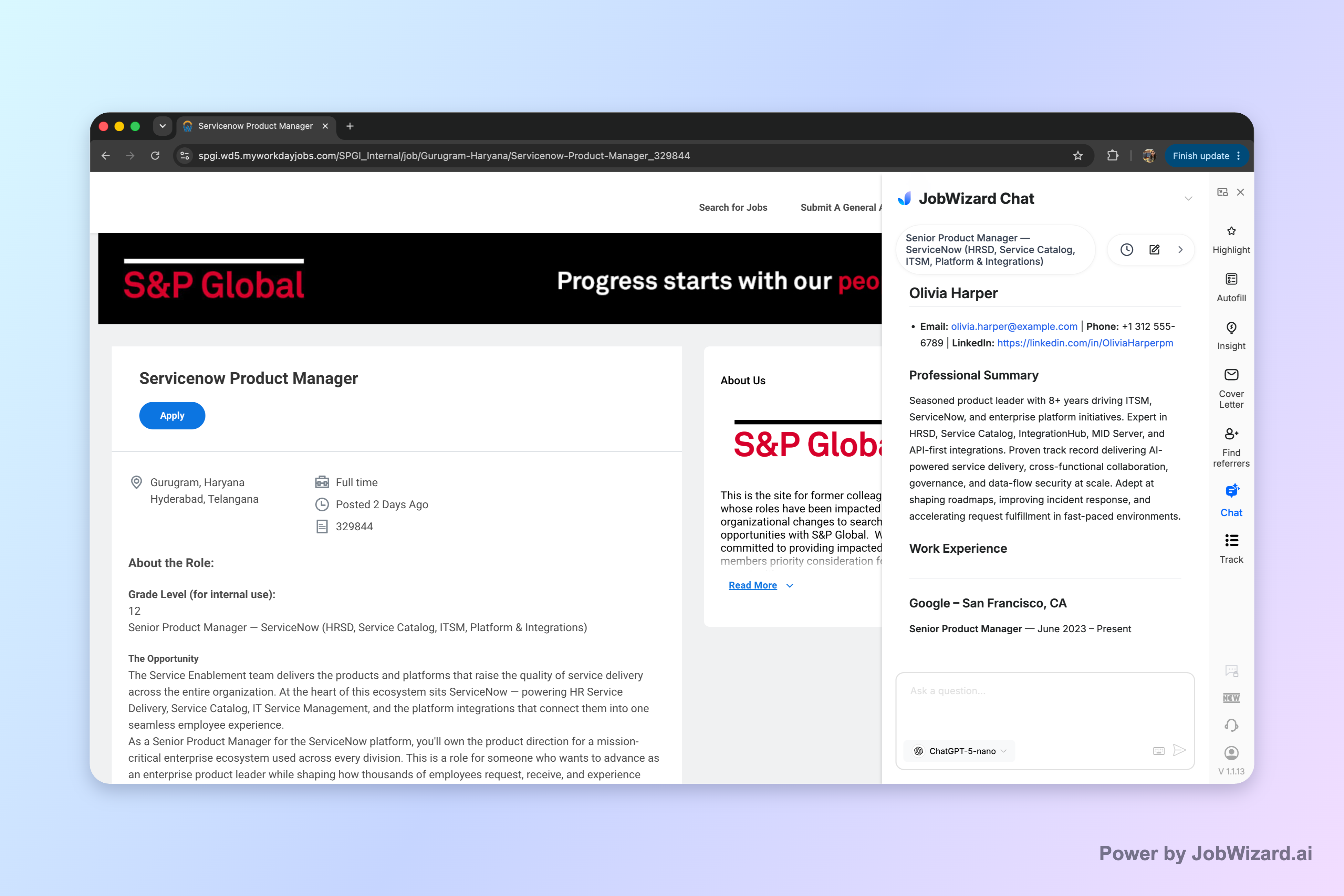
Run your resume against a specific job description and see which keyword gaps are worth fixing.
Do this automatically with JobWizard
Skip the manual work — JobWizard's Match Score handles this for you.
FAQ
How many ATS resume keywords should a Software Engineer resume include?
For most roles, aim to include the top 12–20 keywords you see repeatedly in the job description, then support them with 2–4 tailored bullets (plus a concise skills section). Quality and truthfulness matter more than volume.
Should I add keywords from the job description word-for-word?
Only if they’re accurate for you. It’s okay to mirror the JD’s wording when it matches your experience. If you used a different tool, align at the functional level (e.g., “event-driven messaging” instead of claiming “Kafka” if you didn’t use it).
Will JobWizard guarantee I pass ATS screening?
No tool can guarantee ATS outcomes, because screening depends on many factors (role seniority, experience alignment, missing required fields, and hiring volume). JobWizard helps you apply faster, reduce form errors, and improve keyword consistency across ATS applications.
What’s the best way to optimize keywords for multiple Software Engineer job types?
Create one keyword map per job family (frontend, backend, full-stack, platform/SRE) and then tailor the top bullets and summary for each specific posting. Using JobWizard smart autofill helps keep your core info consistent while you focus on relevance.
Does JobWizard’s free tier have unlimited use?
No. The free tier includes a fixed daily quota, not unlimited usage. If you plan to apply frequently, check /pricing to choose a plan that fits your daily workflow.
Next step: Install JobWizard and use smart autofill to complete ATS applications faster, then use AI cover letter generation to reinforce your ATS resume keywords with job-specific context. Ready to apply this week? Download JobWizard from our homepage CTA and review /pricing for the right daily quota.
Frequently Asked Questions
See your resume's match score for any job
JobWizard compares your resume to each job description and shows the exact keywords to add — free.